
The Orator: Speech Prompter
Not claimedFocus on what you want to say
By GEUM SANG YOO · ProductivityWhy we expect it: A clear, well-scoped teleprompter utility with thoughtful timing features, offline privacy, and a fair free tier suits a focused audience.


About
Focus on what you want to say. The Orator brings your script, reading pace and presentation time together.
For a talk, lesson, work presentation or wedding toast: prepare your words, rehearse at your own pace and take them with you on iPhone and iPad.
Prepare your script Paste text or import TXT, Markdown and RTF files. Review section timing, edit headings and paragraphs, and split or merge text while keeping the original source.
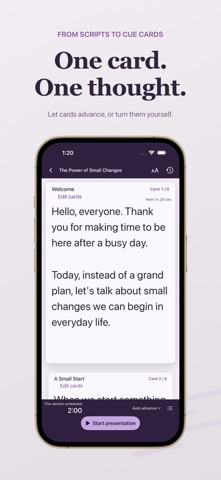
Read at your own pace Measure a comfortable pace with a short reading exercise, or start with the default pace. Choose a scrolling manuscript or cue cards, use automatic movement or advance manually, and mark places to pause.
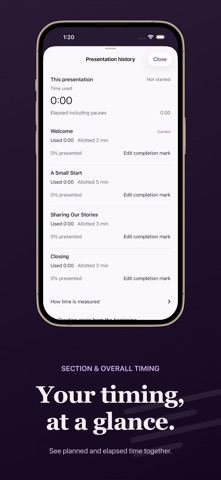
Follow your presentation time See planned and used time for each section alongside the overall elapsed time. Explore another part of your script, return to where you were reading, or reset the progress to rehearse again.
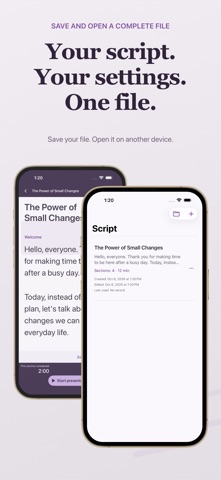
Keep a complete manuscript file An .orator file includes the text, formatting, timing, reading settings and saved reading position. Save it with Files or iCloud Drive and open it on another device. Save the file again to transfer later edits. Each device keeps its own local library.
Made for iPhone and iPad Adjust the text size, use light or dark appearance, and read and edit with controls that adapt to your screen.
Create and present one personal script for free. A one-time in-app purchase unlocks multiple scripts, script duplication and records of talks you have given. Customers who bought the paid app keep full access at no extra charge. No subscription, advertising or separate app account is required. Available in Korean, English, Japanese, Simplified Chinese and Traditional Chinese.
On iPhone Duo in tabletop posture, keep your current cue card above the fold while the next card and presentation controls stay below. In book posture, cue-card view places the current and next cards side by side.
People rate it
Sign in to rate this app. Honest is what counts.
No ratings yet. Tried it? Be the first to rate it.