
Timetable Tamer
Not claimedTimetable Tamer is a lesson-bell timer made for teachers
By THOMAS REGINALD JONES · Education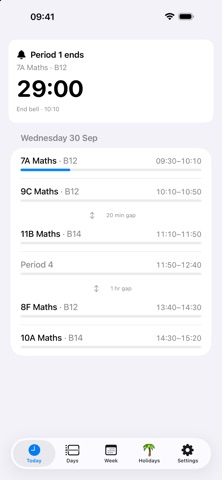


About
Timetable Tamer is a lesson-bell timer made for teachers. Tell it your timetable once and it counts down to every bell — warning you a few minutes before, then tapping your wrist right on time. No more glancing at the clock mid-lesson or overrunning into break.
WHY TEACHERS LIKE IT • A big, glanceable countdown to the next bell on your iPhone, Apple Watch, and the lock screen. • A discreet wrist tap before each bell, so you can wrap up without watching the clock. • Set it up once; it just runs, every school day.
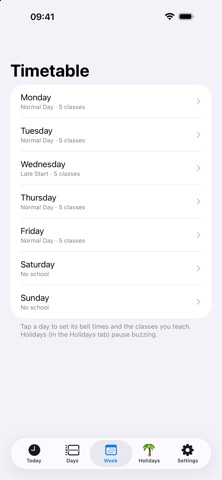
YOUR TIMETABLE, YOUR WAY • Build day types ("Normal Day", "Late Start"…) with the exact bell times for each period. • Assign a day type to each weekday — with full support for weekly OR fortnightly (Week A / Week B) timetables. • Name the class you teach each period (e.g. "10B Maths") and add the room — they show on every screen. • Free periods are shown muted, so your teaching lessons stand out at a glance. • Mark school holidays — buzzing pauses automatically on days off.
ON YOUR WRIST • A native Apple Watch app with a live next-bell countdown. • A watch-face complication so the countdown is always in view. • Wrist-tap warnings delivered as time-sensitive notifications.
ALWAYS IN VIEW • A Live Activity puts the countdown on your lock screen and in the Dynamic Island. • Swipe between days on the home screen to check tomorrow's (or next week's) timetable. • Per-period progress bars show how far through the day you are.
DIALLED IN • Calibrate to your school's real bell down to the second, if it runs a little early or late. • Choose warnings (e.g. 5 and 2 minutes), whether to buzz on the start bell, end bell, or both, and which device taps you. • Back up and restore your whole schedule as a file via iCloud Drive.
PRIVATE BY DESIGN • No account, no sign-up, no ads, no tracking. Your timetable stays on your devices (and your own iCloud, if you make a backup).
Made by a teacher, for teachers. Set your bells once and get on with the lesson.
People rate it
Sign in to rate this app. Honest is what counts.
No ratings yet. Tried it? Be the first to rate it.