
TimeThere: Menu Bar Time Zones
Not claimedCan I ping them now?
By SEONGIK KIM · Productivity


About
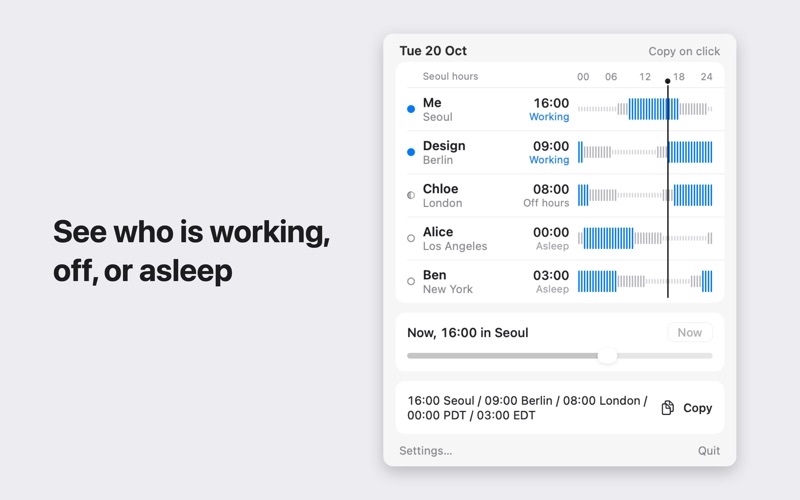
Can I ping them now? TimeThere answers in one glance, from your menu bar.
One row per teammate or city. Each row shows the local time, the day (+1d, -1d) and one word: Working, Off hours or Asleep. A 24 hour bar chart on a shared axis shows when your days overlap.
DAYLIGHT SAVING WITHOUT SURPRISES - The US and Europe switch on different dates. For a few weeks, the gap to your teammates changes and recurring meetings move by an hour. - TimeThere shows a notice in the popover when a gap changes. - It sends a notification 7 days and 1 day before: "In 7 days: your gap with Alice (Los Angeles) changes from 17h to 16h on Mar 8." - Two zones that switch on the same day cause no warning, because the gap did not change.
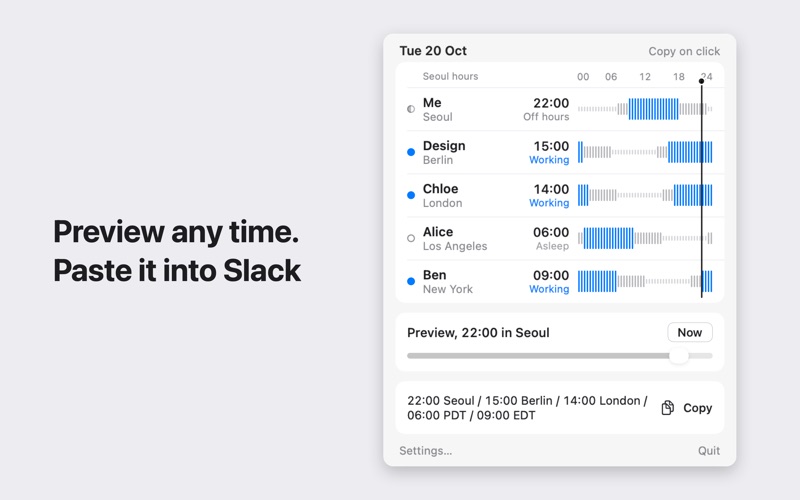
MADE FOR REMOTE TEAMS - Slide to any hour and see what time it is for everyone. - Click a row to copy a line such as "09:20 KST / 16:20 PT / 19:20 ET" for chat or email. - Search zones by city, country, abbreviation (PST, IST, KST) or offset (GMT+9, UTC-8, GMT+5:30). - Set work hours and sleep hours per person. - Show a chosen teammate's time next to the menu bar icon, for example "Alice 16:20". - Open the popover from anywhere with Option+Command+T.
PRIVATE BY DESIGN - No account, no network, no analytics. Your teams never leave your Mac. - Uses the time zone data built into macOS, so rules stay current with system updates. - Light and dark mode. Launch at login.
One purchase. No subscription.
People rate it
Sign in to rate this app. Honest is what counts.
No ratings yet. Tried it? Be the first to rate it.