
Tonami
Not claimedThank you for reviewing Tonami
By JASON STUART CAPLAN · Music and audioWhy we expect it: Clear value for beginners and teachers, backed by careful testing notes and a focused, well-explained instrument concept.


About
Thank you for reviewing Tonami. Screen recordings from physical devices are attached, each starting from app launch.
Tested on physical devices: iPhone 16, iPad Air (3rd generation) with Apple Pencil, and a MacBook Pro, each on the latest operating system. Tonami is complete on a single device; nothing else is needed to review it.
1. Screen recordings Attached: iPhone and iPad (on the iOS submission) and Mac (on the macOS submission). Tonami has no accounts, no login, no user-generated content and no paid content or features in this version.
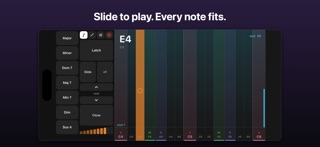
2. Purpose and audience Tonami is a musical instrument you play by sliding a finger, Apple Pencil, mouse or trackpad along a strip of notes. Every note snaps to the chosen scale, so it never plays a wrong note. One-touch chords, inversions, voicings and an arpeggiator let people make music immediately, while colour-coding and chord labels show how music theory works as they play.
It is for beginners, children and adults who want to make music without years of practice, hobby musicians sketching ideas for GarageBand, and music teachers: several iPads and iPhones can join a Mac and play together, each with its own instrument. The problem it solves: traditional instruments take a long time before they sound good, and music theory feels abstract. Tonami makes playing rewarding from the first minute and makes the theory visible.
3. How to use the main features No login or setup is needed. - On first launch a short hands-on tour starts (it can be skipped; replay it from Settings on iPhone/iPad or Help ▸ Take the Tour on Mac). - Play: touch or click and slide on the strip. Left is low, right is high; higher on the strip adds modulation. - Chords: hold a chord pad (Major, Minor, 7th…) on iPhone/iPad, or hold keys Z–M on Mac. The up/down inversion controls and the voicing control rearrange the chord. - Arpeggiator: choose a pattern (Up, Down…) and rate, then hold a chord. - Setup: octave, key and scale, instrument sound, tempo and metronome. - Record and export: tap Rec (Space on Mac) to record; Export shares a standard MIDI file (Files, AirDrop, GarageBand). - Optional, needs a second device: "Send MIDI to Mac" (Setup ▸ screen icon on iPhone/iPad) plays GarageBand on a Mac, or joins a Jam hosted by Tonami for Mac (Jam button). These connections are local and device-to-device only. The system's Local Network permission prompt appears only if the user turns this on; declining it leaves every other feature working. - On Mac, ⌘? lists every keyboard control.
4. External services None. Tonami has no servers, accounts, analytics, advertising, AI services or payment processors. It uses only Apple frameworks on the device: AVFoundation (sound), CoreMIDI (MIDI output), MultipeerConnectivity and Network MIDI (optional local connections between the user's own devices) and SwiftUI. No data leaves the user's devices.
5. Regional differences None. The app works the same in all regions. The interface is in English.
6. Third-party material Tonami bundles the GeneralUser GS sound bank (version 2.0.3) by S. Christian Collins. Its license explicitly permits use in software projects, including commercial ones: https://github.com/mrbumpy409/GeneralUser-GS/blob/main/documentation/LICENSE.txt (a copy of the license is included inside the app bundle). The app does not operate in a regulated industry.
People rate it
Sign in to rate this app. Honest is what counts.
No ratings yet. Tried it? Be the first to rate it.
More Music and audio apps
Best new Music and audio apps this week KlingKlang – Control de AudioKlingKlang reúne todas las salas de tu sistema Sonos en una sola pantalla
 BANANA-1One banana
 Acord: Guitar Tuner, MetronomeAcord is a precise tuner and metronome for every musician
 MonandaegMōnandæg is two field recorders that cannot leave anything alone
 Yul — Gugak Tuner & JangdanA tuner and rhythm trainer built for Korean traditional instruments
 MusiquitosMusiquitos es una app de música para niños con treinta canciones para cantar, bailar y…