
Tsunagi: 3D Linked Todos
Not claimedA todo app for keeping the "these belong together" in your head exactly where it is
By Koji Tamatsu · Productivity


In short
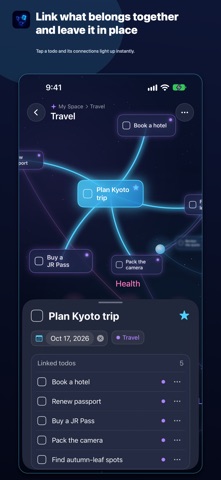
Tsunagi: 3D Linked Todos is a productivity app that shows todos as cards floating in 3D space, where users link related items with glowing lines to form groups. It is aimed at people who want to see tasks and their connections together. A standout detail is that a link can carry a before/after order, so the next todo is marked Up next once the earlier one is done.
Summary by Debuts, based on the App Store listing.About
A todo app for keeping the "these belong together" in your head exactly where it is.
In Tsunagi, todos aren't rows in a list. They are cards floating in a 3D space with real depth. Link related todos with glowing lines, and groups like travel, work, and home emerge like constellations. Orbit, zoom in, and pull back to see both the big picture and the connections at once.
PLACE TODOS IN 3D SPACE - Drag with one finger to orbit, two fingers to move, pinch to zoom - Nearby todos appear as cards, distant ones as glowing dots, with natural depth blur - Drag a todo to move it around in space - Show Everything frames every todo on screen - Auto Arrange tidies a messy layout, cluster by cluster - Tap the minimap to jump to a distant area
LINK RELATED TODOS - Long-press a todo and drag to another to link them - Release on empty space to add a new todo there, already linked - The selected todo's links light up while others dim - See linked todos as a list and as a small link map in the details
SET AN ORDER AND SEE WHAT'S NEXT - Give a link a before/after order and the line shows an arrow - When the earlier todo is done, the next one is marked Up next - Todos still waiting on an earlier one are dimmed
NEVER MISS A DUE DATE - Overdue, today, and soon-due todos are marked on their cards - Turn on reminders in Settings to get a notification at a set time on the due date
LINK AS YOU ADD - When adding with +, the todo's spot appears in space as a dashed outline - Nearby or selected todos are suggested as links, so you can connect while adding
CLUSTERS AND SPACES - Group todos into color-coded clusters (e.g. Travel, Work, Health, Home, Learning) - See each cluster's todo count and progress, and tap it to list its todos - List every todo in a space, grouped by cluster - Create separate spaces for different purposes and switch between them
TODO ESSENTIALS - Completion, stars, due dates, notes, and subtasks - Search by keyword and jump to that todo in space - Undo right after deleting - Export a backup file and restore it, for example on a new iPhone - Hide completed todos or lines, and adjust depth blur and line glow
On first launch, 24 sample todos show how links work. You can delete everything in Settings and build your own space from scratch.
No account, ads, purchases, analytics, or tracking. Your todos and links are stored only on your iPhone and work without an internet connection.
Privacy Policy: https://ko-ji-apps.com/en/tsunagi/privacy
People rate it
Sign in to rate this app. Honest is what counts.
No ratings yet. Tried it? Be the first to rate it.
More Productivity apps
Best new Productivity apps this week ChickMark: Habit TrackerChickMark is a simple habit tracker for routines, goals, and reminders
 Dayflint: One Thing a DayToo many priorities?
 Snappy Do ItSix connected modes. One traceable journey.
 Fristo CAFMFristo is the app for Fristo CAFM, the facility management software
- BeginAnywayMorning alarm for hard tasks: set one task, prove you started, build a streak
 DHUDEDHUDE Analityxs es la herramienta de gestión diaria para grupos de restauración y ocio…