
Turingale: Voice to CRM
Not claimedLESS TYPING, MORE CLOSING Sales reps spend hours every week typing meeting notes into…
By Jared Fischer · Productivity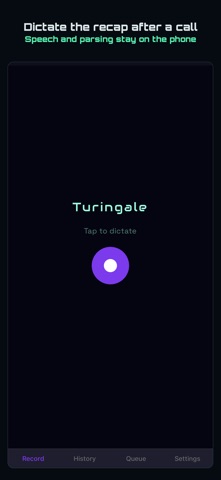


In short
Turingale: Voice to CRM is a productivity app that turns spoken meeting notes into records in Salesforce or HubSpot. The AI model runs on the iPhone, so audio and notes stay on the device and dictation works without a signal, with only the finished record syncing later. Its standout feature is that nothing is pushed to the CRM until the user reviews every parsed action.
Summary by Debuts, based on the App Store listing.About
LESS TYPING, MORE CLOSING Sales reps spend hours every week typing meeting notes into their CRM. Turingale takes that down to thirty seconds per call.
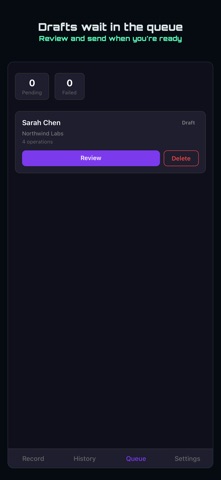
After a meeting, tap the mic and talk through what happened. An AI model running on the iPhone itself pulls out the structure and a clean record lands in your CRM. You see every action on one review screen before anything is pushed.
Salesforce and HubSpot are supported.
YOUR VOICE NEVER LEAVES THE iPHONE Turingale asks iOS for on-device speech recognition and will not record without it. If your iPhone has no offline dictation for English, Turingale tells you how to turn it on and refuses the take rather than send your audio anywhere. The AI that reads the transcript runs on the phone too. There is no server in the middle of your notes: no account to create, no email address to hand over, no per-note meter, and nothing sitting in someone else's database waiting to be breached.
It also means it works where you actually are. In a client's basement, an underground car park, or on a rural road, dictating and parsing need no signal at all. Only the finished record does, and that queues until you reconnect.
THE FLOW 1. Tap the mic. 2. Speak for fifteen to sixty seconds about your meeting. 3. Review the parsed actions. Edit anything, toggle off anything. 4. Push to your CRM.
WHAT GETS CREATED New contacts appear with the fields you mentioned: email, phone, company. Existing contacts are matched by name and organisation, so you don't accumulate duplicates. Notes attach to the right person. Follow-up tasks land with the date you spoke aloud. Deals and opportunities move when you say they moved, and the products you dictate become real line items on them.
WHAT IT WON'T DO It won't infer things you didn't say. It won't push anything before you review it. It won't sync your calendar, scrape your inbox, or touch data you didn't ask it to touch.
WHY THE DOWNLOAD IS THAT BIG Because the whole model is on your phone rather than behind an API. That one wait is what buys everything above: no signal needed, no account, no meter, no data leaving the device. Turingale stores it where iOS can reclaim the space if you ever run out, and re-downloads it if that happens.
CONNECTING HUBSPOT, ONE SMALL THING HubSpot's sign-in page is laid out for a desktop screen and renders small in the in-app browser. Pinch to zoom; every button works. You do this once.
Salesforce connects in your normal browser and does not have this quirk.
OFFLINE READY No service in the parking garage? Record anyway. The dictation queues on the phone and pushes the moment you reconnect.
People rate it
Sign in to rate this app. Honest is what counts.
No ratings yet. Tried it? Be the first to rate it.
More Productivity apps
Best new Productivity apps this week ChickMark: Habit TrackerChickMark is a simple habit tracker for routines, goals, and reminders
 Dayflint: One Thing a DayToo many priorities?
 Snappy Do ItSix connected modes. One traceable journey.
 Fristo CAFMFristo is the app for Fristo CAFM, the facility management software
- BeginAnywayMorning alarm for hard tasks: set one task, prove you started, build a streak
 DHUDEDHUDE Analityxs es la herramienta de gestión diaria para grupos de restauración y ocio…