
TVCall
Not claimedWe made this app in the hope that you can enjoy talking face to face with family and…
By Naoki Ito · Utilities



About
We made this app in the hope that you can enjoy talking face to face with family and friends who live far away.
The faces of the people you talk with most are lined up large on the screen. Just tap a face, and a FaceTime video call begins. There is nothing difficult to learn.
- Tap a face to video call Tap a face once, and a FaceTime video call starts.
- Regular phone calls, too Press and hold a face for 5 seconds to make a regular phone call. Lift your finger before then, and no call is made.
- Faces and colors you can tell apart at a glance Choose from 10 original faces and 15 colors. No photos are used.
- Large text and buttons Text and buttons are large, and VoiceOver is supported.
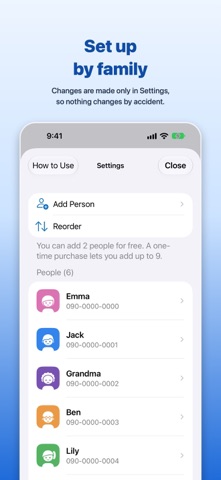
- Set up by family Adding, editing and reordering people happen only in Settings, so nothing changes by accident during everyday use. It's a good idea to have a family member help with the first setup.
- Your information stays on your iPhone You choose people one at a time from Contacts. The app never asks for access to your whole contact list or your photos. Everything is saved only on your iPhone, and no account is needed. There is no advertising or tracking.
- How many people you can add You can add up to 2 people for free. A one-time purchase lets you add up to 9 people. There is no monthly fee.
Calls use the iPhone's FaceTime or Phone app. To talk on FaceTime, the other person also needs to be able to use FaceTime.
People rate it
Sign in to rate this app. Honest is what counts.
No ratings yet. Tried it? Be the first to rate it.