
Usage Pocket
Not claimedUsage Pocket brings usage from your connected AI services into one iPhone app
By Hyun Dong Kim · Utilities


In short
Usage Pocket is an iPhone utility that gathers usage data from connected AI services, including Codex and Claude subscription quotas, OpenRouter spending, and OpenAI and Claude API costs, in one place. It suits people who pay for or use these services and want to track quotas, costs, and token trends. Credentials stay on the device in Keychain, and no operator server receives account details or usage.
Summary by Debuts, based on the App Store listing.About
Usage Pocket brings usage from your connected AI services into one iPhone app.
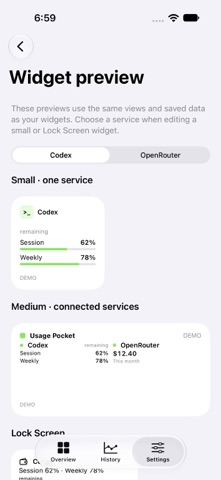
• View available Codex and Claude subscription quotas and reset times • Check spending and configured limits for a connected OpenRouter API key • View organization-wide monthly and daily OpenAI API and Claude API costs • Explore available input/output/cache tokens, request counts, model shares and daily usage trends • View the last 30 days of account activity with an OpenRouter management key • See only successfully connected services on your home screen • Track weekly subscription usage across saved observations and reset cycles • Customize app and service colors, including widgets • Keep local usage history and add small, medium, or Lock Screen widgets • Use English or Korean, with system light and dark appearance
Connect your own accounts directly on your iPhone. No operator server receives your AI account details, credentials, or usage. API keys stay in Keychain, and web sign-ins stay in separate on-device service stores.
You need your own provider account and any required subscription or API key. Available information varies by service and account. Regular OpenRouter keys show key-level costs and limits; management keys show account-wide activity for the last 30 completed days, excluding today. Neither shows your total account balance. OpenAI API and Claude API cost reports require organization Admin API keys; Claude individual accounts are not supported. OpenAI token statistics cover Completions usage, and Claude token statistics cover Messages usage. Claude reports do not provide general request counts. Reports use UTC and can be delayed. Refresh in the app, or enable automatic recording for eligible connections. iOS decides when background refresh runs; fixed intervals and complete history are not guaranteed. Charts use successful local observations, and widgets show the latest saved values. Changes to provider policies or sign-in methods may affect access.
Usage lookups require an internet connection and use network data. Manual refreshes and automatic background lookups use Wi-Fi or cellular data; data charges may apply depending on your plan. You can turn automatic background refresh on or off in the app’s settings.
For more up-to-date widget usage, we recommend enabling automatic background refresh. When it is off, widgets show the last values fetched in the app. iOS controls when background lookups and widget updates run.
Usage Pocket is free and includes a home-screen banner advertisement. See the privacy policy for advertising SDK data practices. There are no in-app purchases.
Usage Pocket is an independent app, not affiliated with or endorsed by OpenAI, Anthropic, or OpenRouter. Privacy policy: https://hdkim99.github.io/usage-pocket-privacy/ Support: https://hdkim99.github.io/
People rate it
Sign in to rate this app. Honest is what counts.
No ratings yet. Tried it? Be the first to rate it.
More Utilities apps
Best new Utilities apps this week Vodoalarm: vodostaji BiHVodoalarm javlja kad tvoja rijeka naglo raste, pa ne moraš stalno gledati vodostaje
 Rokey: Romanian KeyboardType Romanian without worrying about diacritics
 Vibe Island: AI Agent MonitorVibe Island is a command center for the AI coding agents running on your Mac
 Private AuthenticatorPrivate Authenticator keeps your two-factor authentication codes on your own Apple…
 Photo Clean: Photo CleanupA crowded camera roll?
 Songbird AlarmWhat if the morning didn't have to start with a loud noise?