
UsageWatch
Not claimedUsageWatch shows your Codex and Claude Code quota on iPhone, iPad, Home Screen and…
By 梦罗 冯 · UtilitiesWhy we expect it: Clear, careful quota tracking for Codex and Claude Code users, with honest unknown states and thorough privacy controls.

In short
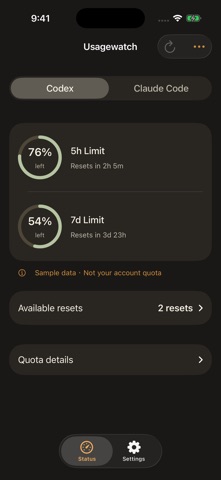
UsageWatch displays Codex and Claude Code quota on iPhone, iPad, Home Screen and StandBy widgets, and Apple Watch, with reset countdowns and the time each reading was collected. It is aimed at people who use either service and want quota status at a glance. It states that unknown values stay unknown and that a missing quota window is never invented.
Summary by Debuts, based on the App Store listing.About
UsageWatch shows your Codex and Claude Code quota on iPhone, iPad, Home Screen and StandBy widgets, and Apple Watch.
See the quota windows your connected service reports, how long until they reset, and when each reading was collected. Codex shows remaining quota; Claude shows used quota. Unknown values stay unknown, and a missing window is never invented.
Connect Codex through OpenAI’s official device-code authorization in your browser. Connect Claude through its official authorization page and return the authorization code to the app. Isolated cloud runtimes read quota through the official tools; no Mac companion is required.
Start with Apple sign-in or skip. Before connecting anonymously, the app explains recovery limits. You can link Apple later to recover your UsageWatch account on another phone. Manage your connected devices, disconnect services, sign out, or permanently delete your UsageWatch account from Settings.
Features: - Codex and Claude Code quota, reset countdowns and reading freshness - Progress bars, quota rings, quota overviews and large percentage widgets - Home Screen and StandBy widgets - Apple Watch app and supported watch-face complications - Two-service comparisons in rectangular Watch positions - Optional alerts when quota runs low - Labeled local sample data for trying layouts without an account - English and Simplified Chinese
Quota availability depends on your provider account and the data returned by its official tools. A supported OpenAI or Anthropic account is required for real quota readings. UsageWatch is an independent app and is not affiliated with Apple, OpenAI or Anthropic.
People rate it
Sign in to rate this app. Honest is what counts.
No ratings yet. Tried it? Be the first to rate it.
More Utilities apps
Best new Utilities apps this week Vodoalarm: vodostaji BiHVodoalarm javlja kad tvoja rijeka naglo raste, pa ne moraš stalno gledati vodostaje
 Rokey: Romanian KeyboardType Romanian without worrying about diacritics
 Vibe Island: AI Agent MonitorVibe Island is a command center for the AI coding agents running on your Mac
 Private AuthenticatorPrivate Authenticator keeps your two-factor authentication codes on your own Apple…
 Photo Clean: Photo CleanupA crowded camera roll?
 Songbird AlarmWhat if the morning didn't have to start with a loud noise?