
Video Background Remover: AI
Not claimedRemove the background from videos of people, directly on your iPhone
By Oskar Polster · Photo and video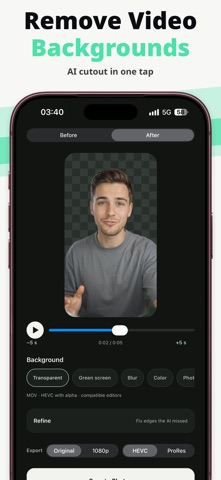




About
Remove the background from videos of people, directly on your iPhone.
Choose a video, tap Remove Background, and see the result on your own clip. Then keep it transparent, switch to green screen, blur the original background, or put a color, photo or video behind you.
HOW IT WORKS • Choose a video from your library, or open one from Files, Mail or AirDrop • Trim it to the part you need • Preview the first 10 seconds of the real result, and load more if you want • Compare before and after • Pick a background: transparent, green screen, blur, color, photo or video • Export, save to Photos or share
MADE FOR VIDEO • Frame-to-frame smoothing reduces flicker around hair and edges • Refine: paint Keep or Erase over spots the automatic cutout missed, with zoom, undo and redo • Your original audio, frame rate and orientation are kept • HDR videos are converted to standard dynamic range for editing and export • On iOS 26 and later, processing continues while you use other apps
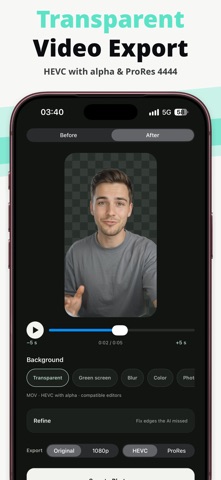
EXPORT FORMATS • Transparent video: HEVC with alpha (.mov) for Final Cut Pro, Keynote and other compatible editors • ProRes 4444 with alpha for professional editing software (on iPhones that support ProRes) • Original resolution or 1080p • Green screen: MP4 that works in almost any editor • Blur, color, photo or video background: MP4 ready to post
PRIVATE BY DESIGN • Videos are processed on your iPhone • No account and no video upload • Works offline
GOOD TO KNOW The app is built for videos of people. Results depend on lighting, motion and how clearly the person stands out from the background. Fine hair and objects close to the body can need a touch of Refine. Some players show transparent video on black; use green screen for those.
PRO Previewing is free. Exporting requires Pro, available as a weekly or yearly subscription or as a one-time lifetime purchase. Prices are shown in the app before you buy. Subscriptions renew automatically unless cancelled at least 24 hours before the end of the current period; manage or cancel them in your App Store account settings. Purchases can be restored in the app.
Terms of Use: https://oskar14156.github.io/ai-video-background-remover/terms.html Privacy Policy: https://oskar14156.github.io/ai-video-background-remover/privacy.html
People rate it
Sign in to rate this app. Honest is what counts.
No ratings yet. Tried it? Be the first to rate it.