
VMherd
Not claimedVMherd puts the live consoles of your Proxmox VE virtual machines and containers in one…
By The Integrators BV · Utilities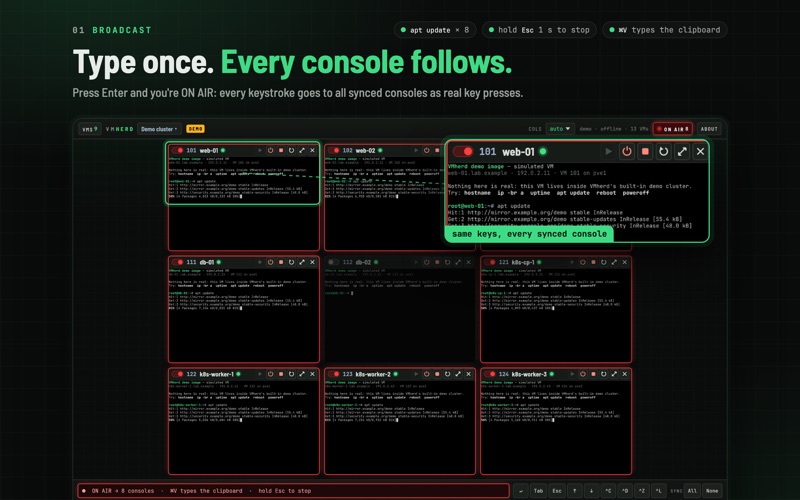




In short
VMherd is a native Mac app that shows the live consoles of Proxmox VE virtual machines and containers in one window and can send keystrokes to all of them or to just one. It is aimed at sysadmins and DevOps engineers who install, rescue and bootstrap machines before SSH is available. A built-in demo cluster with 13 simulated machines lets users try every feature without a server.
Summary by Debuts, based on the App Store listing.About
VMherd puts the live consoles of your Proxmox VE virtual machines and containers in one native Mac window, and lets you type into all of them at once, or into just one.
Made for sysadmins and DevOps engineers who install, rescue and bootstrap machines before SSH works: OS installers, first logins, network setup, boot menus, recovery shells.
TRY IT WITHOUT A SERVER • A built-in demo cluster with 13 simulated VMs and containers shows every feature: live consoles, broadcast typing, placeholders and power buttons. It runs entirely inside the app.
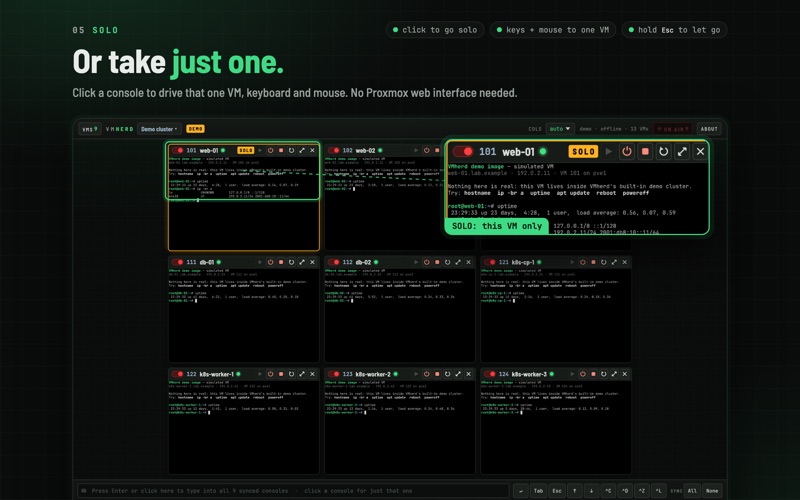
ONE KEYBOARD, MANY MACHINES • Broadcast: click the broadcast bar (ON AIR) and every keystroke goes to all synced consoles at the same time, as real key presses. • A sync toggle on every tile decides which consoles follow along. Sync All or None in one click. • Solo: click a console to type and use the mouse in that VM only. • Type text: send a command or a script to every synced console, with an adjustable per-character delay for reliable input. • Per-VM placeholders: {{vmid}}, {{name}}, {{node}}, {{ipv4}} and {{ipv6}} are filled in for each VM, so one line such as "hostnamectl set-hostname {{name}}" gives every machine its own value. Addresses come from the QEMU guest agent or the container's interfaces. • Buttons for Enter, Tab, Esc, arrow keys, Ctrl+C, Ctrl+D, Ctrl+Z and Ctrl+L. In broadcast or solo mode, ⌘V types the clipboard and asks first when it holds several lines. • Hold Esc for one second to stop; a short Esc goes to the consoles.
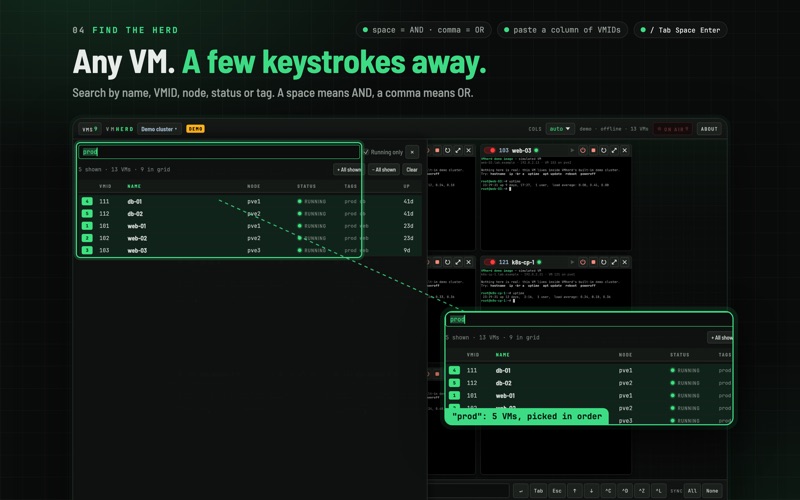
FIND AND PICK VMS FAST • Filter by name, VMID, node, status or tag: a space means AND, a comma means OR. Paste a column of VMIDs to select exactly those. • Running only, sortable columns (VMID, name, node, status, tags, uptime) and natural name order: web-2 comes before web-10. • Click to add or remove, shift-click for a range, or stay on the keyboard: / opens the list, Tab and arrow keys move, Space picks. • Tiles appear in the order you pick them. Automatic layout or up to 8 columns. Each cluster remembers its grid.
CONTROL EACH MACHINE FROM YOUR DESKTOP • Every tile shows VMID, name and a status lamp above its live console, plus node and uptime when there is room. • Start, shut down (ACPI) or hard stop a single VM without opening the Proxmox web interface. Shutdown and stop need a second click. • Maximize any console to the full window. Consoles connect by themselves while a VM runs, so you see it boot, and reconnect after a drop. • Consoles open in shared mode: a Proxmox web console that is already open stays connected.
MULTIPLE CLUSTERS • Bookmark any number of Proxmox VE clusters or single nodes and switch between them from the top bar.
SECURE BY DESIGN • API token authentication (user@realm!tokenname). You decide what the token may do: VM.Audit and VM.Console, plus VM.PowerMgmt for the power buttons. • Token secrets are stored in your macOS Keychain, never in the settings file. • HTTPS only for remote servers. Self-signed Proxmox certificates are pinned on first use by their SHA-256 fingerprint, like SSH host keys. A changed certificate is refused until you trust it again. • No account, no analytics. VMherd connects only to the servers you add.
NATIVE AND FAST • Written in Rust, with its own VNC client. No browser tabs, no plugins. • Runs natively on Apple silicon and Intel Macs.
REQUIREMENTS • A Proxmox VE server or cluster that your Mac can reach over HTTPS (usually port 8006). • An API token with VM.Audit and VM.Console, plus VM.PowerMgmt for the power buttons. • For {{ipv4}} and {{ipv6}} on VMs: the QEMU guest agent in the VM, and VM.Monitor (Proxmox VE 8) or VM.GuestAgent.Audit (Proxmox VE 9) on the token. • Broadcast keystrokes follow the guest's own keyboard layout. "Type text" uses US key codes, so the guest needs a US layout for it. • The app is in English.
Proxmox is a registered trademark of Proxmox Server Solutions GmbH. VMherd is not affiliated with or endorsed by Proxmox Server Solutions GmbH.
People rate it
Sign in to rate this app. Honest is what counts.
No ratings yet. Tried it? Be the first to rate it.
More Utilities apps
Best new Utilities apps this week Vodoalarm: vodostaji BiHVodoalarm javlja kad tvoja rijeka naglo raste, pa ne moraš stalno gledati vodostaje
 Letter Explainer: PostklarGot an official letter and only understand half of it?
 NadhirNadhir is an independent app
 Rokey: Romanian KeyboardType Romanian without worrying about diacritics
 Vibe Island: AI Agent MonitorVibe Island is a command center for the AI coding agents running on your Mac
 Private AuthenticatorPrivate Authenticator keeps your two-factor authentication codes on your own Apple…