
Voice Notes to Webhook - Whim
Not claimedCapture voice notes on iPhone and Apple Watch, then send them straight to your own…
By Israel de la Barrera Lora · ProductivityWhy we expect it: Clear, privacy-focused voice capture with offline support and thoughtful Apple Watch integration makes a promising debut.



About
Capture voice notes on iPhone and Apple Watch, then send them straight to your own workflow.
An idea on a walk. A reminder between meetings. A thought you want to return to. Whim helps you capture it while it's fresh, with quick recording and a destination you control.
CAPTURE IN THE MOMENT Record from your iPhone or Apple Watch. Start with Siri, Shortcuts, a Watch complication, or the iPhone Lock Screen control. On supported iPhones, assign Whim's recording shortcut to the Action button. Record a quick thought or up to five minutes of audio.
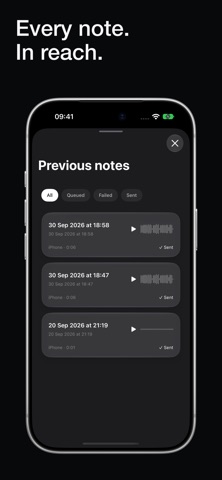
KEEP RECORDING OFFLINE No connection? Your notes stay saved locally, ready for delivery when connectivity returns. See what's waiting, what's been sent, and what needs attention. Play back your recordings and retry failed deliveries from your iPhone.
CONNECT YOUR OWN WORKFLOW Configure an HTTPS webhook to receive your audio and note details directly from your device. Use your own server or a compatible webhook receiver to feed a workflow you've built. Optional authentication and request signing help secure delivery.
USEFUL TITLES, ON YOUR DEVICE When supported and enabled, on-device speech recognition turns the start of your note into a short title. Watch notes receive titles after reaching your iPhone. Only the generated title is retained from transcription; recognition stays on your device.
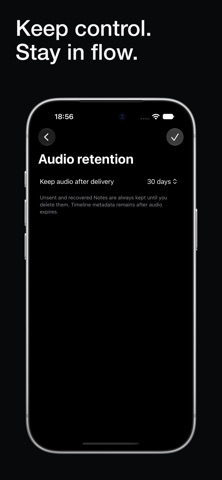
YOUR THOUGHTS. YOUR CONTROL. No account, ads, or Whim-hosted cloud storage. Recordings are stored locally and sent to the webhook you choose. Set how long to keep local audio after successful delivery.
Start recording right away and configure your destination when you're ready. Automatic delivery requires your own compatible HTTPS webhook; Whim does not provide a hosted destination.
Requires iOS 18 or later. The companion Apple Watch app requires watchOS 11 or later.
People rate it
Sign in to rate this app. Honest is what counts.
No ratings yet. Tried it? Be the first to rate it.