
VoxaPair
Not claimedVoxaPair helps you translate spoken conversations between two selected languages
By haven he · UtilitiesWhy we expect it: The description clearly explains a focused translation value, with no account or subscription needed.
In short
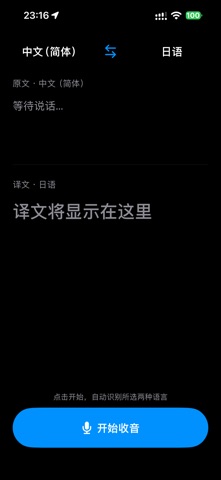
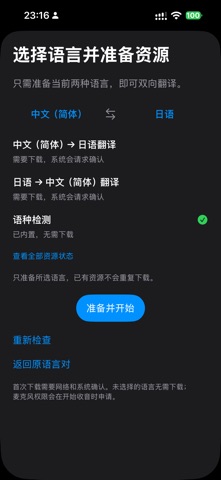
VoxaPair is a utilities app that translates spoken conversations between two languages you select from a list that includes Japanese, Korean, Thai, Vietnamese, and Chinese. It shows the recognized text and its translation, then plays the translated speech aloud. One notable point is that it can detect which of the two chosen languages is being spoken, or you can set the direction manually.
Summary by Debuts, based on the App Store listing.About
VoxaPair helps you translate spoken conversations between two selected languages. Choose from Simplified Chinese, Traditional Chinese, Japanese, Korean, Thai, and Vietnamese, then speak to see the recognized text and its translation. Listen to the translated speech or replay it when needed. VoxaPair can detect which of your two selected languages is being spoken, and also offers manual direction selection. Speech recognition and translation use Apple’s system features. Some language resources may need to be downloaded before first use. The app is free to use and may display a banner ad. An optional one-time in-app purchase removes ads from this app. No subscription or VoxaPair account is required. Requires iOS 26 or later. Language availability depends on device and system resources.
People rate it
Sign in to rate this app. Honest is what counts.
No ratings yet. Tried it? Be the first to rate it.
More Utilities apps
Best new Utilities apps this week Drainly: Speaker CleanerMuffled speaker after a splash, rain, or a sweaty workout?
 Photo & PDF Resize: KBFile too large to upload?
 Arvectum Proxy LauncherArvectum Proxy Launcher is a network utility that routes your iPhone through a proxy you…
 Vodoalarm: vodostaji BiHVodoalarm javlja kad tvoja rijeka naglo raste, pa ne moraš stalno gledati vodostaje
 TidyShots: Screenshot CleanerScreenshots pile up fast: receipts, memes, codes you needed once, directions you already…
 Screenshot Tidy: Sort & FindYou saved it