
WAY - Where Are You at Home
Not claimed"Where did I put it?" Now every item at home has an address
By DONGHWAN KIM · LifestyleWhy we expect it: A thoughtful home-organization idea with clear value, a well-explained workflow, and careful privacy disclosures.



In short
WAY - Where Are You at Home lets people sketch their home layout, give rooms, cabinets and shelves codes, and log where each item is kept and when it was moved. It suits anyone who often loses track of belongings at home. One notable point is that data stays on the iPhone by default, and optional QR labels can file items into spaces automatically.
Summary by Debuts, based on the App Store listing.About
"Where did I put it?" Now every item at home has an address.
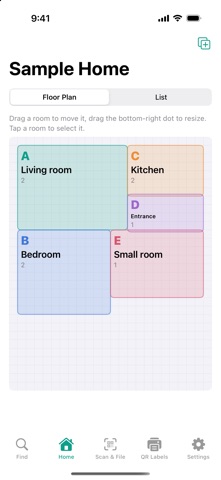
WAY (Where Are You) lets you sketch your home's layout and give each room, cabinet and shelf a space code, so you always know where things are. Like a work breakdown structure for your home, spaces are organized step by step.
[Sketch your home] - Draw rooms as rectangles and drag them into place - Codes are added automatically: rooms A, B, C, storage spots A1, A2, shelves A1-1
[Add items and track moves] - Register items with a name, photo, notes and tags - When you move an item, WAY records when and where it went
[Find] - Search shows the exact path, like "B Bedroom > B2 Closet > B2-3 Third shelf" - The room is highlighted on your floor plan
[Faster with QR labels] - Print QR labels for spaces and items on A4 sheets - Scan a space label, then item labels, and they're filed automatically
[AI floor plan import (optional)] - Get room suggestions from a floor plan image you bring in, then review and edit them before applying - No accuracy is guaranteed, and you always check the result before it is applied - Optional: every other feature works the same without it
[Privacy] - No sign-up, no ads, no tracking - Your home layout and items are stored only on your iPhone by default; export a backup file whenever you like - Only if you choose to use the AI floor plan feature and give consent, the selected floor plan image and the hints you enter are sent to OpenAI or Anthropic using your own API key - API usage costs are billed to you separately; ChatGPT and Claude subscriptions do not include API usage
Supports Larger Text for comfortable reading.
People rate it
Sign in to rate this app. Honest is what counts.
No ratings yet. Tried it? Be the first to rate it.
More Lifestyle apps
Best new Lifestyle apps this week askoraAI 회상 노트
 Familjekalender – familjens årFamiljekalender är en delad kalender för hela familjen, där varje dag kan bära ett foto…
 My Anime TrackerAnime watch order, no guesswork.
 Sakinah: Quran, Adhkar & DuaSakinah brings the Qur'an, the prayer and daily remembrance together in one calm app, in…
 Mizwala: Prayer Times & QiblaMizwala is a calm, focused companion for the five daily prayers
 Starhush: Calm ConstellationsSpend five quiet minutes before sleep connecting the stars of the night sky, one by one…