
Wedding Seating: Table Planner
Not claimedMake a clear seating plan, from your guest list to the documents your venue needs
By STARTFLOW LABS S.R.L. · ProductivityWhy we expect it: Clear tagline, detailed description and on-device guest data make this a promising, well-explained wedding planner.



In short
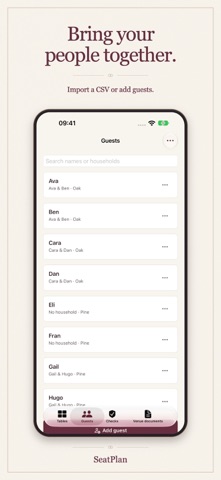
Wedding Seating: Table Planner helps couples build seating plans from a guest list, import CSV files or add guests by hand, and check for missing tables, capacity problems, and keep-apart conflicts. It suits people organizing a wedding who need venue-ready PDF and CSV files, and its data stays on the device with no account required.
Summary by Debuts, based on the App Store listing.About
Make a clear seating plan, from your guest list to the documents your venue needs.
SeatPlan helps you organize wedding guests, keep households together and arrange tables. Import a CSV guest list or add people by hand. Set table names and capacities, then assign or move guests as your plans change.
CHECK YOUR PLAN See guests without a table, capacity problems and keep-apart rule conflicts. Open an issue to find the people involved and decide where they should sit.
PREVIEW VENUE DOCUMENTS Read the complete guest index and table roster before you pay. Final PDF and CSV files use the same saved plan revision. Private household labels and seating rules stay out of the venue documents.
FREE TO START Manage one active event, import guests, arrange tables, check the plan and preview documents. JSON backup export and import are free.
PERSONAL: ONE PAYMENT Unlock final PDF and CSV files for one active event at a time. Archive an event when it is complete, then use your Personal access for the next event. Personal has no expiry.
PLANNER: MONTHLY SUBSCRIPTION Manage several active events and copy table names and capacities to a new event. Final PDF and CSV files are included while Planner access is active. Planner renews monthly until cancelled. Manage or cancel it in App Store subscriptions. Files you have already saved remain available after access ends.
KEEP CONTROL OF YOUR DATA No app account is required. Guest lists and seating plans are stored on your device. Export a JSON backup to keep a copy or transfer an event. Backup transfer is manual.
Each event supports up to 500 guests and 100 tables, with 1 to 50 places per table.
Terms of Use: https://www.apple.com/legal/internet-services/itunes/dev/stdeula/ Privacy: https://sflbs.com/privacy
People rate it
Sign in to rate this app. Honest is what counts.
No ratings yet. Tried it? Be the first to rate it.
More Productivity apps
Best new Productivity apps this week ChickMark: Habit TrackerChickMark is a simple habit tracker for routines, goals, and reminders
 Dayflint: One Thing a DayToo many priorities?
 Fristo CAFMFristo is the app for Fristo CAFM, the facility management software
- BeginAnywayMorning alarm for hard tasks: set one task, prove you started, build a streak
 DHUDEDHUDE Analityxs es la herramienta de gestión diaria para grupos de restauración y ocio…
 Fillerless: Teleprompter CoachFillerless is a teleprompter that follows your voice and then tells you how you spoke