
WiFi 4 Breakfast
Not claimedJoined the Wi-Fi, but still not online?
By Kapish Bhardwaj · Utilities


About
Joined the Wi-Fi, but still not online?
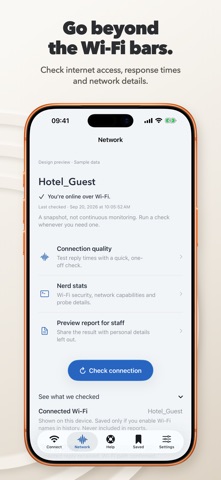
WiFi 4 Breakfast helps you try the public network’s sign-in page, check whether your Wi-Fi reaches the internet, and find the next useful step.
WI-FI SIGN-IN HELP Open a rescue address in your browser to try to reach the hotel, airport or café’s sign-in page. The network may reconnect without showing a login, or the browser may show our help instead.
CHECK THE WI-FI CONNECTION Run small connection checks restricted to Wi-Fi. See the result and what each check received. A quick three-reply check shows response times; it is not a download-speed test.
HELP THAT WORKS OFFLINE Follow bundled guides for missing sign-in pages and connection problems. Install the app before you travel so the instructions are already with you.
YOUR RECENT CHECKS Optionally keep recent results on this device. Saving Wi-Fi names is a separate choice. Preview a report before sharing it; network names and addresses are left out.
USEFUL EXTRAS • Network details where iOS makes them available • Home Screen and Lock Screen widgets and a rescue Shortcut • Local reading highlights for terms you choose to paste or import • English and German, with light and dark appearances
No app account, advertising or in-app purchases in this release. Rescue works without permission to show your Wi-Fi name.
The app cannot bypass passwords, payments or access restrictions. A connection result is a snapshot, not a network-safety rating or a guarantee every app will work. Our check services or device settings may affect the result. Wi-Fi names depend on iOS permissions. Terms highlights are a reading aid, not legal advice.
Learn more: https://wifi4breakfast.app Support: support@onekapisch.com
People rate it
Sign in to rate this app. Honest is what counts.
No ratings yet. Tried it? Be the first to rate it.