
WiFi Plan: Map & Analyser
Not claimedWiFi Plan is a WiFi map and analyser for your home
By PDS Technology LTD · UtilitiesWhy we expect it: Clear, well-described value with thoughtful honesty about limits, a useful home WiFi niche, and strong screenshot coverage for a promising debut.



In short
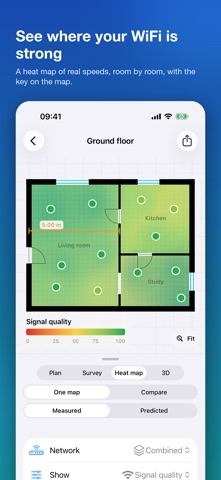
WiFi Plan is a WiFi map and analyser for iPhone and iPad. It turns a LiDAR room scan or a hand-drawn floor plan into a heat map built from measured download, upload, latency and jitter at each point. It is aimed at homeowners who want to see where their WiFi is weak, including in the garden and on upper floors. One notable point is that it measures real speeds because iOS does not allow apps to read WiFi signal strength.
Summary by Debuts, based on the App Store listing.About
WiFi Plan is a WiFi map and analyser for your home. Scan your rooms with LiDAR, walk round measuring the speed you actually get, and see the coverage as a heat map on your own floor plan.
SCAN OR DRAW YOUR PLAN On an iPhone or iPad with a LiDAR scanner, walk slowly through the rooms and WiFi Plan turns the scan into a tidy floor plan of straight walls, doors and windows. Scan a whole floor in one go, or a few rooms at a time: each extra scan arrives as its own part, and when you drag it onto the house it snaps on and joins it. An outbuilding stays a building of its own. No LiDAR? Draw the walls with your finger, as lines or rectangles. Name the rooms, pick their colours, flip a door the right way, show wall lengths, and lock the plan when it is right so nothing moves while you survey.
UPSTAIRS AND OUTSIDE Add every floor of the house and line each one up over the floor below. Step out of a door and walk round the edge of the garden: the area you walk becomes the boundary of your plot, with the house inside it, so you can measure the WiFi in the garden too.
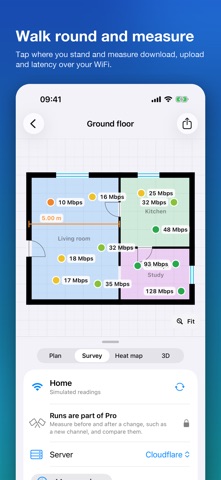
WALK ROUND AND MEASURE Stand somewhere, tap the plan where you are, or let Locate me find you, and tap Measure here. At each point WiFi Plan measures the connection you actually get over your WiFi: download and upload speed, latency and jitter, combined into a simple quality score from 0 to 100.
An honest note on what is measured: iOS does not let apps read WiFi signal strength, so WiFi Plan does not show signal bars or decibel readings. It measures real speeds instead, which is what you feel when a video buffers or a call breaks up. Your internet connection is the same everywhere in the house, so the differences between points come from the WiFi.
SEE WHERE YOUR WIFI IS GOOD The heat map fills in the plan from your points, green where the WiFi is good and red where it struggles, with a key on the map and a summary for each room. Look at download, upload, latency or the overall score, one network at a time or combined, as a phone that roams between them would see it. A colour blind friendly scale is one switch away.
ROUTERS, EXTENDERS AND MESH Tell WiFi Plan about your router and extenders and where they sit. It works out which box each measurement came through, so you can see the area each one really covers. Thinking of adding one? Drop a virtual extender on the plan to see the predicted coverage, or ask for suggested spots, before you buy.
COMPARE AND BEFORE AND AFTER Compare your 2.4 GHz and 5 GHz networks, or the router against an extender, side by side, as an overlay or as a difference map. Change something, such as the channel or where the extender sits, start a new run and measure the same points again to see exactly what got better.
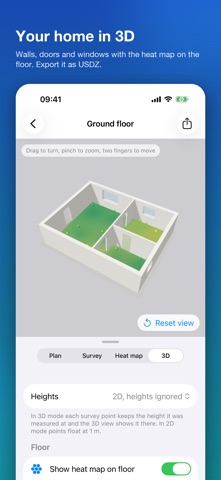
3D AND EXPORTS See the whole house in 3D, every floor stacked, with the heat map on the floor. Export floor plans, heat maps and compare maps as PDF or PNG, a full PDF report with a page per floor, the 3D model as USDZ, a DXF floor plan for CAD, an IFC model for BIM tools, and your measurements as CSV or JSON.
PRIVATE BY DESIGN Your plans and measurements stay on your device, and in your own iCloud if you turn sync on so they appear on your other devices. There is no account to make and nothing is sent to us. Location permission is needed only because iOS asks for it before telling any app the name of your WiFi network; your location is never stored.
FREE TO TRY Try the built in sample house, then map one floor of your own with up to three survey points for free. WiFi Plan Pro is a single one off purchase, not a subscription, and unlocks unlimited projects, floors and points, exports, compare, before and after runs and predicted coverage.
Scanning needs an iPhone or iPad with a LiDAR scanner. Everything else works on any supported iPhone or iPad, including iPhone Duo. Help for every feature is in Settings.
People rate it
Sign in to rate this app. Honest is what counts.
No ratings yet. Tried it? Be the first to rate it.
More Utilities apps
Best new Utilities apps this week Vodoalarm: vodostaji BiHVodoalarm javlja kad tvoja rijeka naglo raste, pa ne moraš stalno gledati vodostaje
 Rokey: Romanian KeyboardType Romanian without worrying about diacritics
 Vibe Island: AI Agent MonitorVibe Island is a command center for the AI coding agents running on your Mac
 Private AuthenticatorPrivate Authenticator keeps your two-factor authentication codes on your own Apple…
 Photo Clean: Photo CleanupA crowded camera roll?
 Songbird AlarmWhat if the morning didn't have to start with a loud noise?