
WorkReveal: Before & After
Not claimedTurn your hard work into before-and-after photos and videos worth sharing
By Mikhail Sterlikov · ProductivityWhy we expect it: Clear value for trade businesses, with thoughtful matching guides and privacy-minded exports that make before-and-after sharing easy.





In short
WorkReveal: Before & After is a productivity app that helps trade professionals such as pressure washers, detailers, cleaners, painters, landscapers and handymen build matching before-and-after photos and videos. It uses the original photo as a see-through guide to line up after shots, then exports side-by-side images, collages or reveal videos with business branding. Job names are hidden from exports by default to protect customer addresses.
Summary by Debuts, based on the App Store listing.About
Turn your hard work into before-and-after photos and videos worth sharing. WorkReveal helps you capture matching shots, add your business details and show the difference to clients and on social media.
Made for pressure washing, auto detailing, cleaning, painting, landscaping and handyman work.
FROM FINISHED JOB TO READY-TO-SHARE
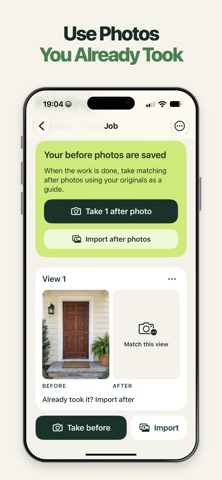
1. Take your before photos or import them from Photos. 2. Use the original photo as a see-through camera guide to line up your after shot. 3. Choose a layout, add your branding and share an image, collage or reveal video.
MATCH THE ANGLE. SHOW THE DIFFERENCE. Make your results easier to compare with a see-through guide, adjustable opacity, grid and horizon level. Capture several areas of a job, then work through the matching after photos one by one.
Already took the photos? Import your before and after shots, check the pairs and put them together.
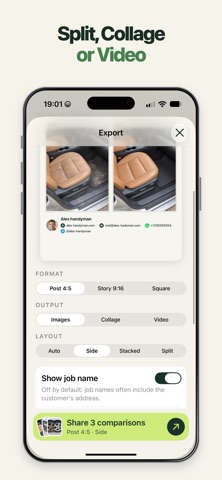
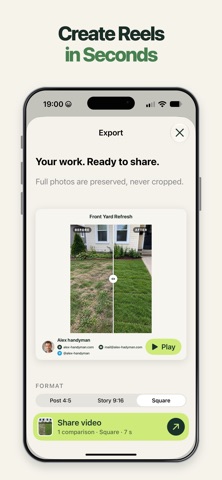
ONE JOB. MORE WAYS TO SHARE. • Before-and-after images: side by side, stacked or split with an adjustable divider • Collages with up to 6 comparisons • Reveal videos that transition from before to after, with up to 6 areas in one clip • Post 4:5, Story 9:16 and Square formats for social feeds, Reels, TikTok and Stories • Export layouts that preserve the full photo • Share through Messages, Mail, AirDrop, Files and other compatible apps
PUT YOUR BUSINESS ON EVERY RESULT Add your logo, business name and the contact details you want clients to use. Include your phone, website, email or social profiles, and reuse your branding across jobs.
Choose whether to include your branding on each export. Job names are hidden from exports by default, helping you avoid sharing a customer’s address by mistake.
KEEP YOUR JOBS IN ORDER Group jobs into categories that fit your work. See which ones still need after photos and when you last exported them.
Keep client names, phone numbers, addresses and notes with the job, with shortcuts to call, message, email or get directions. These separate client details are excluded from shared images and file names.
NO ACCOUNT. NO ADS. Capture, organize and create exports offline. No sign-up required. Share your work when you choose.
People rate it
Sign in to rate this app. Honest is what counts.
No ratings yet. Tried it? Be the first to rate it.
More Productivity apps
Best new Productivity apps this week ChickMark: Habit TrackerChickMark is a simple habit tracker for routines, goals, and reminders
 Dayflint: One Thing a DayToo many priorities?
 Fristo CAFMFristo is the app for Fristo CAFM, the facility management software
- BeginAnywayMorning alarm for hard tasks: set one task, prove you started, build a streak
 DHUDEDHUDE Analityxs es la herramienta de gestión diaria para grupos de restauración y ocio…
 Fillerless: Teleprompter CoachFillerless is a teleprompter that follows your voice and then tells you how you spoke