
Xcribe: Private Voice Recorder
Not claimedYour voice notes stay yours
By B2B Edge LP · Productivity


In short
Xcribe: Private Voice Recorder is an iPhone app for recording meetings, lectures and ideas, with all recordings and settings stored on the device. It needs no account, shows no ads and never uploads recordings, and it offers quality presets from compact speech files to uncompressed WAV. What stands out is that it recovers a take after an unexpected close.
Summary by Debuts, based on the App Store listing.About
Your voice notes stay yours. Xcribe is a calm, private recorder for meetings, lectures and ideas, with every recording kept on your iPhone. No account. No ads. Nothing uploaded. Just tap and talk.
Record with confidence • Start with one tap, then pause and resume while a live waveform follows your voice • Keeps recording when you lock the screen or switch apps • Type a title, pick a category and add tags while you record, or while paused • Leave the title empty and the recording is numbered for you. Edit any detail later • If Xcribe closes unexpectedly mid-take, the recording comes back the next time you open the app, with the details you typed
Sound that fits the moment • Four quality presets: Voice for compact speech files, Standard, High and Lossless • Record in AAC, or in uncompressed WAV when every detail matters
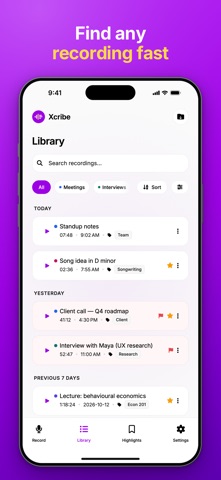
Find any recording fast • A library grouped by Today, Yesterday, Previous 7 days and earlier • Live search across titles, tags and categories • Sort by newest, oldest, longest, shortest or name • Filter by favorites, important, category or tags • Swipe to delete, or touch and hold any recording to share, play, star, flag, edit or delete it
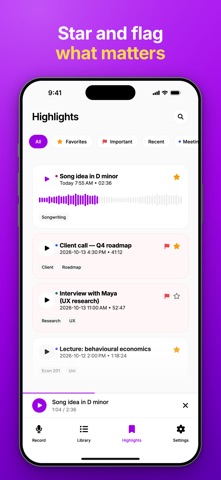
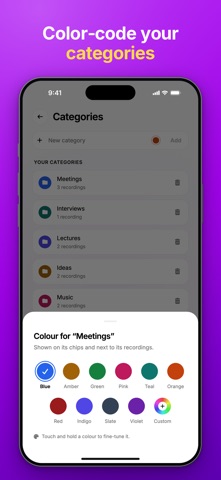
Organize it your way • Give each category its own color: pick one of ten presets or mix your own • Manage your categories and tags in one place. When you remove one, choose whether your recordings keep it • Star favorites and flag what is important. Highlights keeps them together, with quick filters for Favorites, Important, Recent and your categories
Listen back • A full player with a waveform you can tap or drag to jump to any moment • Playback speed from 0.5x to 2x • Skip back or forward by 5, 10, 15 or 30 seconds, whichever you prefer • A mini player keeps your recording in reach while you browse
Bring audio in, send it out • Import several audio files at once from the Files app and organize them with the rest of your library • Share any recording as an audio file named after its title
Private by design • Your recordings, categories, tags and settings are stored on your iPhone, not on a server • No account, no sign-in, no ads and no analytics. Xcribe never uploads your recordings • A recording leaves your iPhone only when you share it yourself, or as part of your own device backup • The microphone is used only while you record • See how much space your recordings use, and delete them whenever you like
Xcribe works with larger text sizes and VoiceOver.
People rate it
Sign in to rate this app. Honest is what counts.
No ratings yet. Tried it? Be the first to rate it.
More Productivity apps
Best new Productivity apps this week ChickMark: Habit TrackerChickMark is a simple habit tracker for routines, goals, and reminders
 Dayflint: One Thing a DayToo many priorities?
 Fristo CAFMFristo is the app for Fristo CAFM, the facility management software
- BeginAnywayMorning alarm for hard tasks: set one task, prove you started, build a streak
 DHUDEDHUDE Analityxs es la herramienta de gestión diaria para grupos de restauración y ocio…
 Unlocky: Training App BlockerLock the apps that eat your day