
yAuth: 2FA & MFA Authenticator
Not claimedYour codes, passwords, and recovery tools - all in one place
By Ocara Sonal · Utilities


About
Your codes, passwords, and recovery tools - all in one place.
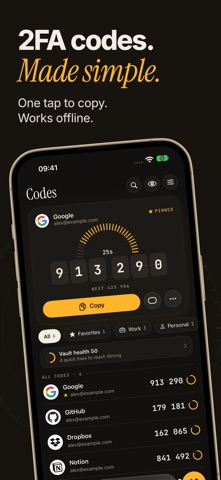
Auth makes signing in faster and easier. Keep your two-factor authentication codes and passwords together, find the account you need in seconds, copy a fresh code, or check it right from your Apple Watch. Organize your accounts, protect your vault, recover access when you need it, and keep everything close at hand.
TWO-FACTOR CODES, WITHOUT THE FUSS Generate time-based verification codes for services that support authenticator apps. Your codes work offline, so you can access them even without a mobile connection. Pin important accounts, organize them into folders, and add tags to find what you need faster.
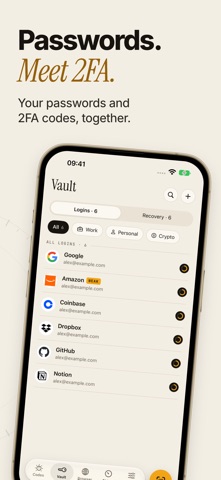
PASSWORDS + 2FA IN ONE PLACE Store your logins in the password vault and link each one directly to its verification code. Generate strong passwords and use AutoFill for passwords and one-time codes in supported apps and websites. AutoFill requires iOS 18 or later.
YOUR CODES. ON YOUR WRIST. Use Auth on Apple Watch to access your accounts and large, easy-to-read verification codes without reaching for your iPhone. Synced codes are stored on your watch and remain available even when your iPhone is out of reach.
MOVE YOUR ACCOUNTS EASILY Switching authenticator apps doesn’t have to mean starting over. Import accounts from Google Authenticator using its export QR codes, or add accounts by: • Scanning a QR code • Choosing a photo or file • Opening a setup link • Entering a setup key • Importing supported exports from other authenticator apps
SEE WHAT NEEDS ATTENTION Shield helps you identify weak and reused passwords and accounts without saved recovery codes. Protect access to your vault with a passcode and Face ID or Touch ID. Travel Mode lets you hide selected folders, while a separate decoy passcode can open a decoy vault.
KEEP A WAY BACK Store recovery codes alongside your accounts so they’re there when you need them. Create an encrypted backup or generate a printable Recovery Kit PDF with optional password protection for safe offline storage. Turn on iCloud sync to keep your vault records in sync through iCloud Keychain.
QUICK ACCESS WHEN YOU NEED IT Use widgets and Live Activities to reach your codes faster. The built-in private browser can detect two-factor authentication QR codes on a page and warn you when a website’s domain doesn’t match the website saved for an account.
AUTH PREMIUM Auth Premium is required to save accounts and logins, enable iCloud sync, and use Shield tools. Available plans and prices are shown in the app before purchase. Subscriptions renew automatically unless cancelled at least 24 hours before the end of the current subscription period. You can manage or cancel your subscription in your App Store account settings.
Privacy Policy: https://telegra.ph/PRIVACY-POLICY-10-05-238 Terms of Use: https://telegra.ph/TERMS-OF-USE-10-05-6
People rate it
Sign in to rate this app. Honest is what counts.
No ratings yet. Tried it? Be the first to rate it.