
AIwake: Keep Awake for AI
Ikke gjort krav påLong agent runs should not stop because your Mac fell asleep
Af Nikita Letov · Værktøjer


Kort fortalt
AIwake: Keep Awake for AI is a menu bar and Dock utility that holds a macOS power assertion while Claude Code, Cursor or Codex sessions are working, then lets the Mac sleep again when they finish. It suits developers running long agent tasks, and it also offers a manual mode and an MCP interface for other long jobs. Integrations stay off until the user enables them, and the app makes no outgoing connections.
Resumé fra Debuts, baseret på app-siden i App Store.Om appen
Long agent runs should not stop because your Mac fell asleep. AIwake keeps the Mac awake while an AI coding agent is actually working, and lets it sleep as usual as soon as the agent is done.
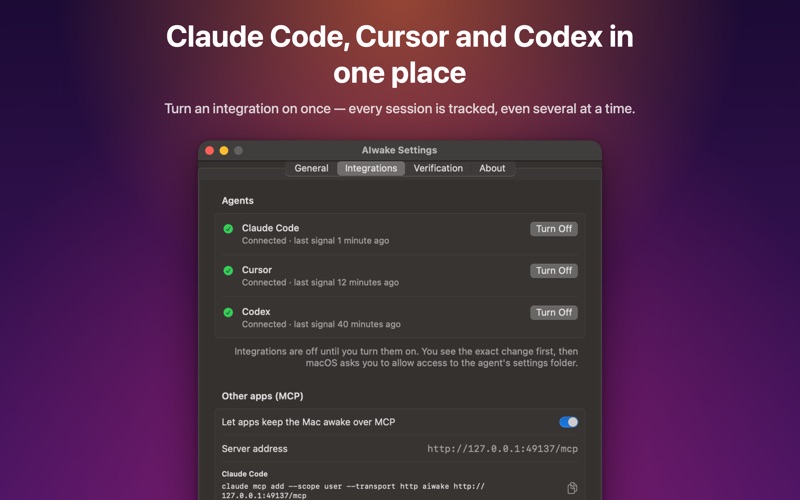
HOW IT WORKS AIwake lives in the menu bar (and, if you like, in the Dock). Claude Code, Cursor and Codex can run small commands — hooks — when a prompt is sent, when a tool or command starts and ends, and when the agent finishes its turn. AIwake adds hooks that report these moments to the app on your Mac. While at least one session is working, the app holds a standard macOS power assertion; when the last one finishes, it lets go.
• Works with Claude Code, Cursor and Codex, several sessions at once • Long builds and test runs stay covered until the command finishes • Safety timeouts release the Mac if an agent quits without saying so • Choose whether an agent waiting for your permission keeps the Mac awake • Optionally keep the display on too • Manual mode: keep the Mac awake for 30 minutes, any length of time you set, until a chosen time, or until you turn it off — no agent needed • On battery, let the Mac sleep once the charge drops below a level you choose — or keep it awake regardless • Any app or agent that speaks MCP (the Model Context Protocol) can ask AIwake to keep the Mac awake for a build, a download or any long job • Menu bar, Dock or both — and the Dock on its own whenever the menu bar is too full to show the icon • Open at login, if you want it to
YOU STAY IN CONTROL Integrations are off until you turn them on. Before anything is changed, AIwake shows the exact text it will add and the file it will add it to, and macOS asks you to allow access to that agent's settings folder. The app changes only that one file, keeps a backup of it, and removes its entries whenever you turn an integration off.
PRIVATE BY DESIGN Signals arrive only on 127.0.0.1, from your own Mac. The app makes no outgoing connections, collects no data, and never stores or logs what the agents send: it reads the session ID and throws the rest away.
TRY IT WITHOUT AN AGENT Settings › Verification sends a test signal, so you can watch a session start and the power assertion appear, then stop it again.
BUY ME A COFFEE AIwake is free, with no ads and no tracking. If it saved one of your long runs, you can leave a tip in the app — it unlocks nothing, it just keeps the developer awake too.
Brugernes bedømmelse
Log ind for at bedømme appen. Det vigtigste er, at du er ærlig.
Ingen bedømmelser endnu. Har du prøvet den? Giv den første bedømmelse.
Flere apps i kategorien Værktøjer
De bedste nye apps i kategorien Værktøjer denne uge Drainly: Speaker CleanerMuffled speaker after a splash, rain, or a sweaty workout?
 Photo & PDF Resize: KBFile too large to upload?
 Arvectum Proxy LauncherArvectum Proxy Launcher is a network utility that routes your iPhone through a proxy you…
 Look Twice: Scam & AI CheckLook twice before you click
 Vodoalarm: vodostaji BiHVodoalarm javlja kad tvoja rijeka naglo raste, pa ne moraš stalno gledati vodostaje
 Sift: Photo CleanupYour camera roll is full of blurry shots, old screenshots and videos you'll never watch…