
Aster - Code Editor
Ikke gjort krav påAster is a code editor for iPhone and iPad
Af CREATIVE JOO Inc. · VærktøjerDerfor forventer vi det: Aster offers a thoughtful, well-scoped mobile code editor with offline Python and JavaScript execution, Files integration, and Git support, a clear value for developers.




Kort fortalt
Aster - Code Editor is a code editor for iPhone and iPad that works with local projects, iCloud Drive, and Git or SFTP remote files. It suits people who want to write and run basic Python or JavaScript on their device, including offline. A notable feature is that Python can run offline with bundled packages such as NumPy.
Resumé fra Debuts, baseret på app-siden i App Store.Om appen
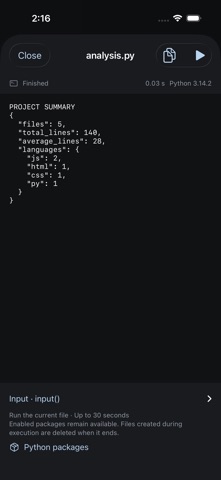
Aster is a code editor for iPhone and iPad. Open local projects or folders from Files, edit code, and inspect its output. Basic Python and JavaScript execution works on your device without an internet connection.
EDIT CODE • Syntax highlighting for Python, JavaScript, TypeScript, HTML, CSS, JSON, Markdown, and more • JavaScript and TypeScript completion; Python keywords, built-ins, and snippets • File tabs, find and replace, undo and redo • Compact coding keys, keyboard controls, and hardware keyboard shortcuts
OPEN PROJECTS • Create local projects, files, and folders • Open iCloud Drive and supported file-provider folders through Files • Recover editing drafts and detect conflicting changes before saving • View your file list beside the editor on iPad
RUN PYTHON AND JAVASCRIPT • Run the current editor file locally • Read output and errors, stop, rerun, and copy output • Use Python's standard library and line-based input() • Select bundled Python packages, including NumPy, for offline use • Inspect JavaScript console.log output and errors
PREVIEW THE WEB • Preview HTML projects inside the app • Test pages with the project's HTML, CSS, and JavaScript
USE GIT AND REMOTE FILES • Connect your GitHub account; list, search, and clone your repositories • Initialize or clone HTTPS repositories; view changes, stage, commit, and switch branches • Fetch, fast-forward pull, and push • Open and save files on your computer or server with SFTP • Run SSH commands and Git on the connected computer • Optionally store credentials in this device's Keychain
SCOPE Local execution is a constrained programming environment. Python uses Pyodide and a supported package catalog. Arbitrary pip commands and PyPI package installation are not available. Node.js, npm, OS shells, and VS Code extensions are not included. Basic runs are limited to 30 seconds, and temporary runtime files do not automatically modify your project. Git uses saved files and does not merge divergent histories or perform rebases. Saving a remote file uploads it; it does not automatically deploy a service.
iCloud synchronization and offline availability are managed by iOS and your file provider. Remote Git/SFTP connections need an internet connection or a network path to the server. SFTP currently uses password authentication; replacing existing remote files also requires SSH shell access.
Requires iOS 18 or later.
Brugernes bedømmelse
Log ind for at bedømme appen. Det vigtigste er, at du er ærlig.
Ingen bedømmelser endnu. Har du prøvet den? Giv den første bedømmelse.
Flere apps i kategorien Værktøjer
De bedste nye apps i kategorien Værktøjer denne uge Drainly: Speaker CleanerMuffled speaker after a splash, rain, or a sweaty workout?
 Photo & PDF Resize: KBFile too large to upload?
 Arvectum Proxy LauncherArvectum Proxy Launcher is a network utility that routes your iPhone through a proxy you…
 BillVoice : Lecteur de billetsPointez votre iPhone vers un billet, touchez l’écran n’importe où et entendez ce que…
 Look Twice: Scam & AI CheckLook twice before you click
 Vodoalarm: vodostaji BiHVodoalarm javlja kad tvoja rijeka naglo raste, pa ne moraš stalno gledati vodostaje