
Cursus – Homework & Exams
Ikke gjort krav påNo more "I'll write it down later." No more homework discovered the night before…
Af Kareem Boulos · Uddannelse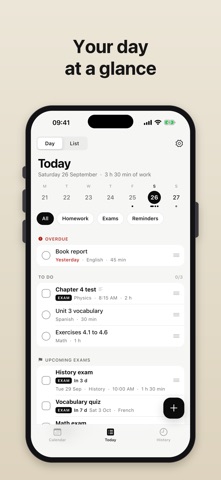


Kort fortalt
Cursus, Homework & Exams is an education app for logging homework, exams and reminders with a date, time and optional notifications. It shows overdue and today's items with progress, a week strip, a month calendar and a customizable form for each item type. One notable feature is that it can sync homework into the phone's own calendar app, such as Apple or Google.
Resumé fra Debuts, baseret på app-siden i App Store.Om appen
No more "I'll write it down later." No more homework discovered the night before, forgotten tests, or photos of the whiteboard lost in your camera roll.
With Cursus, you add homework in three seconds, and Cursus remembers it for you: the right reminder at the right time and your exams always in plain sight.
YOUR DAY AT A GLANCE Open Cursus and you instantly see what's overdue, what's left to do today (with your progress) and the exams coming up, with a countdown. Swipe along the week strip to move between days, or switch to List view to see everything ahead, day by day, with the planned study time.
HOMEWORK, EXAMS AND REMINDERS Three kinds of items, easy to tell apart: homework, exams (clearly flagged) and reminders (a form to hand in, a book to bring, a school trip).
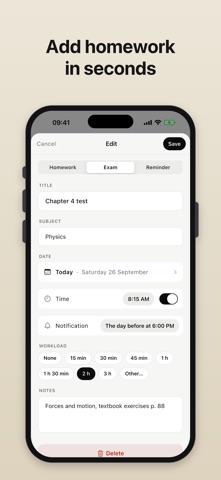
ADDED IN THREE SECONDS A title and a date, that's it. Your subject is remembered and suggested next time. Add a time, study time, notes or a notification if you like.
A FORM THAT FITS YOU Pick the fields you need, in the order you want, separately for homework, exams and reminders. Create your own fields (text, number, checkbox, date, choice list, link…): pages to read, chapters to revise, room, weight, grade received. And choose what shows under each item's title.
NOTIFICATIONS AT THE RIGHT TIME One reminder per item, whenever you want: the day before at 6 PM, the same day, an hour before… With defaults for each kind (for example, exams always the day before). And every evening, if you like, a summary of what's left and what's due tomorrow.
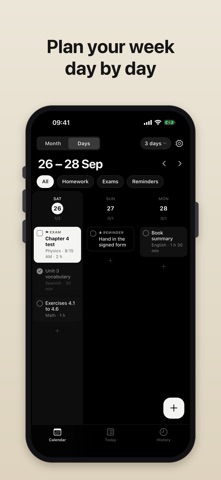
A REAL CALENDAR In Month view, your homework is written right in the cells, readable without opening anything. In Days view, up to 7 columns side by side to plan your week. Drag an item to another day, or reorder your day.
IN YOUR CALENDAR TOO If you like, your homework shows up in your phone's calendar (Apple, Google, Outlook…) with every detail: subject, duration, notes. Finished items disappear on their own.
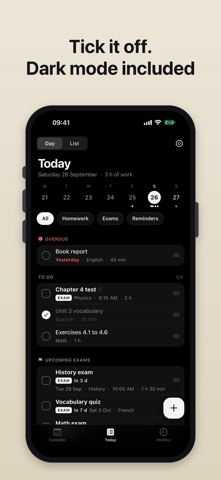
SIMPLE GESTURES Swipe to tick off or delete, long-press to edit, postpone or duplicate. Made a mistake? There's always Undo. A ticked item stays visible until the next day, so you see what you've done.
HISTORY Everything in the past, done or not, sorted by month, with a filter to find what was missed.
USEFUL WIDGETS On your Home Screen, tick off homework without opening the app and add one in a tap.
Brugernes bedømmelse
Log ind for at bedømme appen. Det vigtigste er, at du er ærlig.
Ingen bedømmelser endnu. Har du prøvet den? Giv den første bedømmelse.
Flere apps i kategorien Uddannelse
De bedste nye apps i kategorien Uddannelse denne uge FluencyToolShadow a native Japanese sentence, hear your own voice back, and get scored.
 YoMoo: Read & Shadow JapaneseYoMoo turns real Japanese writing into graded reading practice: news articles, Wikipedia…
 KeyswingLearn music notes, rhythm and piano through playful practice in a magical forest.
 Uncle Math Homeschool - 6 to 8No Math Fear, Uncle Math Is Here
 Malachi SpeaksMalachi Speaks gives a voice to people who don't use speech
 SelvarisWatch evolution unfold in real time – on an entire planet