
DiskPress for Files
Ikke gjort krav påSave space on your iPhone and iPad without moving your files into archives
Af Ihor July · Værktøjer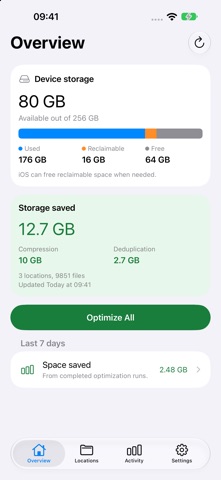



Kort fortalt
DiskPress for Files is a utility that reduces storage used by supported local files on iPhone and iPad using lossless compression and deduplication, while keeping file names, contents and locations unchanged. It is aimed at users who want to free space without moving files into archives, and it works entirely offline with no accounts or analytics. One notable point is that it does not monitor folders automatically; optimization runs only when the user starts it.
Resumé fra Debuts, baseret på app-siden i App Store.Om appen
Save space on your iPhone and iPad without moving your files into archives.
DiskPress for Files uses native lossless compression and deduplication to reduce the storage used by supported local files. Your files keep their names, contents and locations. Open them in your usual apps without unpacking them first.
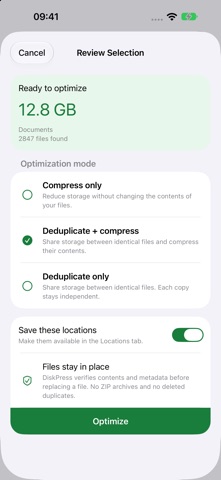
CHOOSE HOW EACH LOCATION WORKS Select Compress only, Deduplicate + compress, or Deduplicate only for each saved location. Include the folders you want in Optimize All, or run one location separately.
OPTIMIZE WHEN YOU CHOOSE Add a local folder from Files, or select files for a one-time optimization. Review your selection before starting. DiskPress does not automatically monitor folders. On iOS 26 and later, supported background processing can continue a run you started when the system allows it. Pause and resume safely when needed.
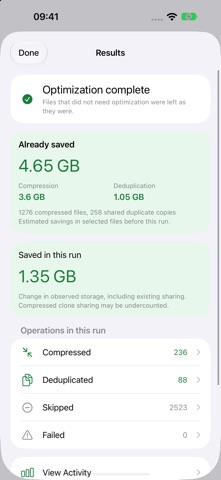
SEE YOUR STORAGE AND SAVINGS Overview shows device storage and estimated savings across your saved locations, split into compression and shared duplicate storage. Results distinguish savings from the current run from savings already present in your files. Activity records completed operations, skipped files and any issues.
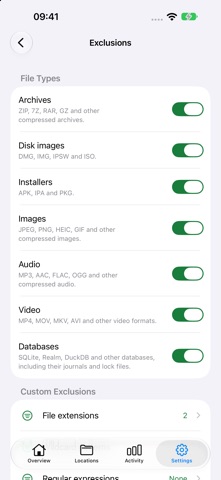
KEEP CONTROL OF YOUR FILES Protect recently changed files, set minimum savings and file size limits, and choose performance settings for battery power and charging. Exclude archives, disk images, installers, images, audio, video and databases. Add your own extension, wildcard and regular expression rules.
BUILT FOR YOUR FILES DiskPress checks file contents and records completed work before counting it as saved. Deduplicated copies remain separate files and can still be edited independently. Native storage optimizations remain in place after DiskPress closes.
PRIVATE BY DESIGN DiskPress works entirely offline and makes no Internet connections. No accounts, analytics or uploads. Your files, access permissions and activity stay on your device. Website links open in your browser, and reports are shared only when you choose.
Works with supported writable local APFS locations on iOS 14 and later. iCloud Drive, cloud and network providers, and aggregate roots such as On My iPhone are not supported. Some local folders restrict the filesystem operations needed for optimization. Choose a supported inner folder when prompted. Savings vary with file contents and existing compression or sharing. Storage savings are estimates.
DiskPress is also available separately for macOS. Learn more at https://diskpress.app.
Brugernes bedømmelse
Log ind for at bedømme appen. Det vigtigste er, at du er ærlig.
Ingen bedømmelser endnu. Har du prøvet den? Giv den første bedømmelse.
Flere apps i kategorien Værktøjer
De bedste nye apps i kategorien Værktøjer denne uge Vodoalarm: vodostaji BiHVodoalarm javlja kad tvoja rijeka naglo raste, pa ne moraš stalno gledati vodostaje
 Rokey: Romanian KeyboardType Romanian without worrying about diacritics
 Vibe Island: AI Agent MonitorVibe Island is a command center for the AI coding agents running on your Mac
 Private AuthenticatorPrivate Authenticator keeps your two-factor authentication codes on your own Apple…
 Photo Clean: Photo CleanupA crowded camera roll?
 Songbird AlarmWhat if the morning didn't have to start with a loud noise?