
Glass Stickies
Ikke gjort krav påGlass Stickies puts sticky notes one keystroke away
Af SUPER SIMPLE LEARNING LTD · ProduktivitetDerfor forventer vi det: Thoughtful description and clear value make this a promising pick for people who like trying new apps.



Om appen
Glass Stickies puts sticky notes one keystroke away. Press Control-Option-Command-N in any app and a note appears, ready to type. It saves as you write, so you can get straight back to what you were doing.
NOTES THAT STAY OUT OF THE WAY • Clear notes are frosted glass: your desktop shows softly through them. • Seven paper colours, from Butter and Mint to Graphite. Text turns white on dark notes automatically, in light and dark mode. • Keep a note on top of every window, or let it sit behind your work until you need it. • Hide a note with one click. It is never deleted, and it comes back from the menu bar. • Hide Stickies puts every sticky away; Show Stickies brings back exactly the ones you hid.
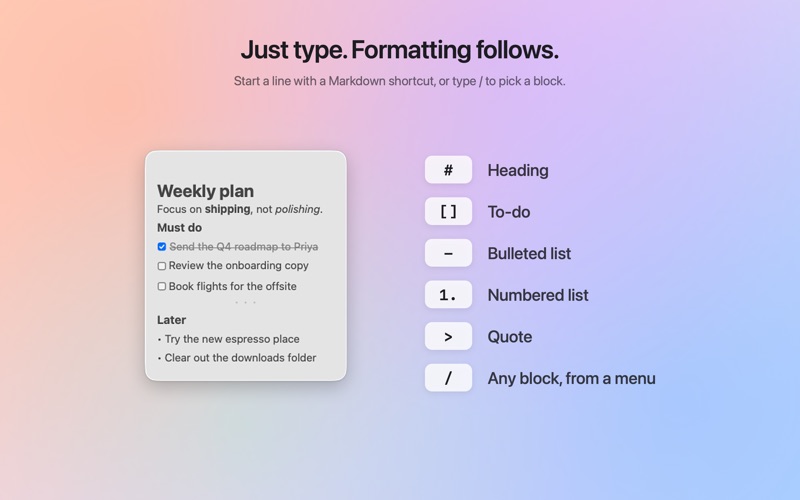
WRITE FAST, WITHOUT A TOOLBAR • Markdown as you type: # for a heading, - for a list, [] for a to-do, **bold**, *italic*, ~~strikethrough~~ and `code`. • Type / for a menu of headings, to-do lists, bulleted and numbered lists, quotes and dividers. • Select text and a small formatting bubble appears with bold, italic, links and more. • Click a checkbox to tick it off. • Keyboard shortcuts for every style, all listed in the Format menu and in Settings. • Choose a typeface for each note (Sans, Serif, Rounded or Mono) and a text size.
FIND ANYTHING • Search every note from the menu bar, or open the larger search window. • The Notes window lists every note with a sidebar you can filter (On Desktop, Hidden, Kept on Top) and sort. • Dates stay calm: a time for today, "Yesterday", a weekday, then the date.
NOTHING GETS LOST • Version history keeps earlier versions of each note, and you can restore any of them. • Deleted notes go to Recently Deleted first, with Undo. You decide whether it empties after 7 days, 30 days or never. • Export every note as Markdown and Rich Text files plus a backup you can import on another Mac.
PRIVATE BY DESIGN • No account, no sign-in, no ads, no analytics, no tracking. • Your notes are stored only on your Mac.
MADE FOR THE MAC • Lives in the menu bar, with no Dock icon until you open the Notes or Settings window. • Set your own global shortcuts for a new note, show or hide stickies, search, and the Notes window. • Optional launch at login, off until you turn it on. • Works on macOS 15 and later, on Apple silicon and Intel Macs.
One price, no subscription, no in-app purchases and nothing locked.
Brugernes bedømmelse
Log ind for at bedømme appen. Det vigtigste er, at du er ærlig.
Ingen bedømmelser endnu. Har du prøvet den? Giv den første bedømmelse.
Flere apps i kategorien Produktivitet
De bedste nye apps i kategorien Produktivitet denne uge ChickMark: Habit TrackerChickMark is a simple habit tracker for routines, goals, and reminders
 Dayflint: One Thing a DayToo many priorities?
 Snappy Do ItSix connected modes. One traceable journey.
 Fristo CAFMFristo is the app for Fristo CAFM, the facility management software
 UhWhat? Voice NotesCatch the thought before it disappears
- BeginAnywayMorning alarm for hard tasks: set one task, prove you started, build a streak