
Hours Tracker: Work Pay
Ikke gjort krav påKnow what went into your estimated pay
Af Yurii Koshkin · ProduktivitetDerfor forventer vi det: Clear, carefully explained hours tracker that keeps records local and handles overtime and currencies thoughtfully.



Kort fortalt
Hours Tracker: Work Pay is a manual hours tracker and timesheet for hourly workers. Users log shifts with breaks and optional tips, then compare estimated gross pay with the gross amount on their payslip. Records stay in local app storage, and no employer account is needed. Its standout feature is a period-by-period comparison of estimated and actual gross wages, with an option to include tips.
Resumé fra Debuts, baseret på app-siden i App Store.Om appen
Know what went into your estimated pay.
Work Pay is a personal hours tracker and timesheet for hourly work. Enter a shift, see its earnings breakdown, and compare your records with the gross amount on your payslip. No employer account is required.
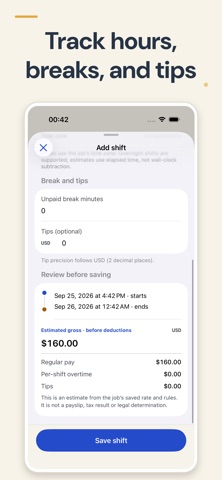
RECORD YOUR SHIFTS Enter start and end dates, unpaid breaks and optional tips. Saved shifts keep their original pay-rate snapshot when you change a job's rate. Edit your records and archive old jobs without losing their history.
UNDERSTAND THE CALCULATION See regular pay, your own optional per-shift overtime rules, tips and estimated gross before taxes or deductions. Overnight shifts and daylight-saving changes use actual elapsed time in the job's saved time zone.
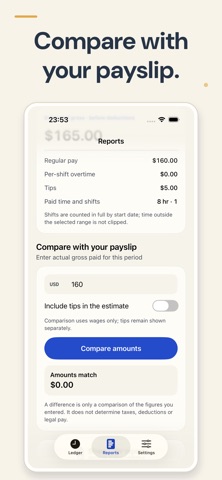
COMPARE GROSS WITH GROSS Choose a reporting period and enter the actual gross paid from your payslip. Compare wages with wages, or choose to include tips. A difference compares your figures; it does not establish a legal entitlement or calculate take-home pay.
KEEP YOUR RECORDS USEFUL Share a CSV report with explicit currencies and dates. Your job and shift records stay in local app storage; no app-operated cloud sync is required. Device backups may include app data according to your Apple settings. Existing records remain available to read, edit and export without an active Pro purchase.
SUPPORTED CURRENCIES USD, EUR, GBP, AUD, CAD, NZD, SEK, NOK, DKK, CHF and JPY. Different currencies are kept separate; currency conversion is not provided.
IMPORTANT DETAILS This is a manual personal ledger, not automated clock-in, employer payroll, a tax calculator or legal advice. Overtime is a user-configured per-shift estimate, not statutory overtime. Whole shifts belong to their start date in the saved job time zone. Reports use CSV, not PDF.
Terms of Use: https://gatoficio.com/apps/work-hours-pay/terms Apple Standard EULA: https://www.apple.com/legal/internet-services/itunes/dev/stdeula/ Privacy Policy: https://gatoficio.com/apps/work-hours-pay/privacy Support: https://gatoficio.com/apps/work-hours-pay/support
Brugernes bedømmelse
Log ind for at bedømme appen. Det vigtigste er, at du er ærlig.
Ingen bedømmelser endnu. Har du prøvet den? Giv den første bedømmelse.
Flere apps i kategorien Produktivitet
De bedste nye apps i kategorien Produktivitet denne uge ChickMark: Habit TrackerChickMark is a simple habit tracker for routines, goals, and reminders
 Dayflint: One Thing a DayToo many priorities?
 Snappy Do ItSix connected modes. One traceable journey.
 Fristo CAFMFristo is the app for Fristo CAFM, the facility management software
- BeginAnywayMorning alarm for hard tasks: set one task, prove you started, build a streak
 DHUDEDHUDE Analityxs es la herramienta de gestión diaria para grupos de restauración y ocio…