
MarkdownBeautiful
Ikke gjort krav påMarkdownBeautiful is a calm, fast reader for Markdown files on your Mac
Af Park Street Post Inc · Produktivitet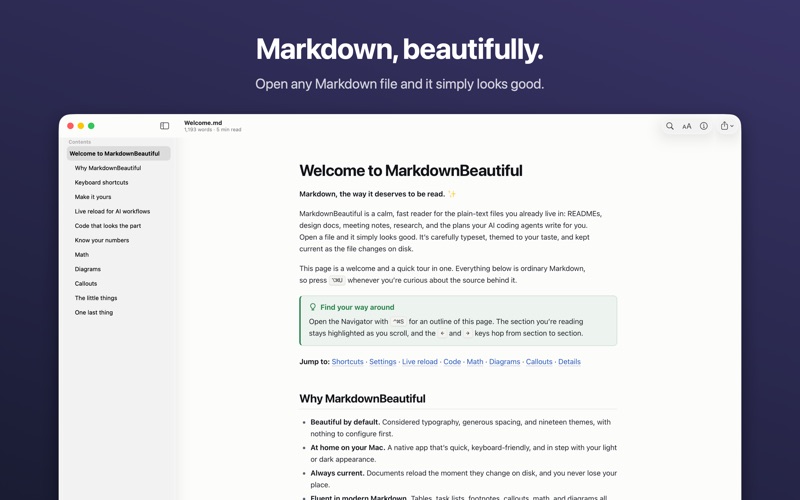


Kort fortalt
MarkdownBeautiful is a Markdown reader for Mac that renders README files, design docs, notes and AI-generated plans with themes, math, and Mermaid diagrams. It also updates the page live when the file changes, and it runs entirely on the device with no account or tracking. Its Pro Tools and EDL report views set it apart for post-production work.
Resumé fra Debuts, baseret på app-siden i App Store.Om appen
MarkdownBeautiful is a calm, fast reader for Markdown files on your Mac. Open a README, a design doc, meeting notes or the plan your AI coding agent just wrote, and it looks the way it should: carefully typeset, themed to your taste, and kept current as the file changes.
BEAUTIFUL BY DEFAULT • 19 themes, light and dark, that can follow your Mac's appearance automatically, plus your own theme files • Any font installed on your Mac, five reading widths, adjustable size and line spacing • Zoom each window on its own
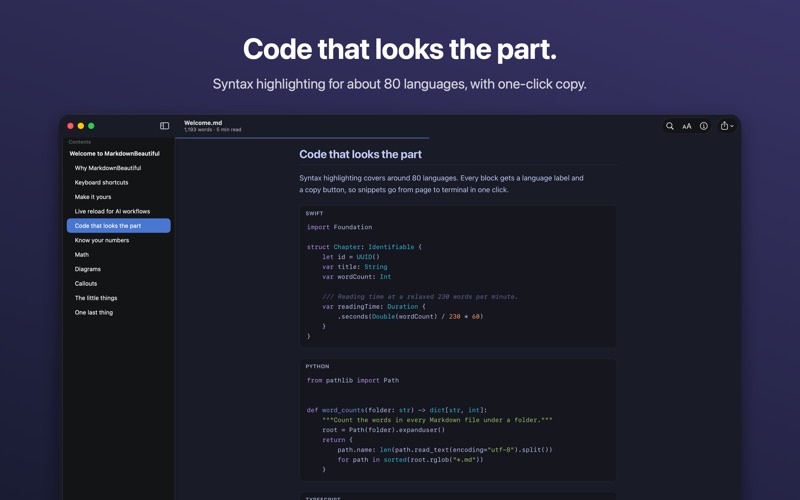
EVERYTHING MODERN MARKDOWN CAN DO • GitHub-flavored Markdown: tables, task lists, footnotes, strikethrough and definition lists • GitHub-style callouts, including collapsible ones • Math, inline and display • Mermaid diagrams: flowcharts, sequence, class, state, Gantt, pie, mindmaps and more • Syntax highlighting for about 80 languages, with a copy button on every code block • Front matter and generated tables of contents
FIND YOUR WAY • An outline sidebar that highlights the section you're reading • Jump between sections with the arrow keys, or hide everything but the text in reading mode • Find in the document • Word count, reading and speaking time, and readability • Open the file in your editor at the line you're reading
ALWAYS CURRENT • Live reload: when another app or an AI agent changes the file, the page updates in place and keeps your place • Every document reopens where you left off
FOR POST-PRODUCTION • Pro Tools "Session Info as Text" exports open as a session report: offline files, muted and inactive tracks, a timeline of every track with its markers, plug-ins and files • Edit decision lists (CMX 3600) open as event reports with a timeline, locators, speed effects, conform warnings and sources ranked by time used
SHARE IT • Export a paginated PDF that keeps your theme, or a self-contained HTML file • Print on clean white paper
AT HOME ON YOUR MAC • Quick Look: press Space on a Markdown file in Finder to see it rendered with your theme • Tabs, drag and drop, and full keyboard control • Also opens code, JSON, CSV and TSV, Mermaid and plain-text files
PRIVATE BY DESIGN Everything renders on your Mac. No account, no tracking, no data collected. Turn off images from the web and documents can't contact any website.
Brugernes bedømmelse
Log ind for at bedømme appen. Det vigtigste er, at du er ærlig.
Ingen bedømmelser endnu. Har du prøvet den? Giv den første bedømmelse.
Flere apps i kategorien Produktivitet
De bedste nye apps i kategorien Produktivitet denne uge ChickMark: Habit TrackerChickMark is a simple habit tracker for routines, goals, and reminders
 Dayflint: One Thing a DayToo many priorities?
 Snappy Do ItSix connected modes. One traceable journey.
 Fristo CAFMFristo is the app for Fristo CAFM, the facility management software
 UhWhat? Voice NotesCatch the thought before it disappears
- BeginAnywayMorning alarm for hard tasks: set one task, prove you started, build a streak