
Rec DJ Pro Max
Ikke gjort krav påYour set, saved straight to your iPhone
Af William Giles · Musik og lyd



Om appen
Your set, saved straight to your iPhone.
Rec DJ Pro Max records audio from compatible USB mixers and interfaces, with the controls you need in the booth and a library for everything you capture.
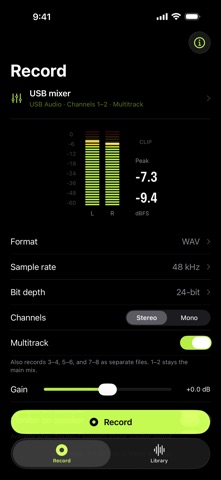
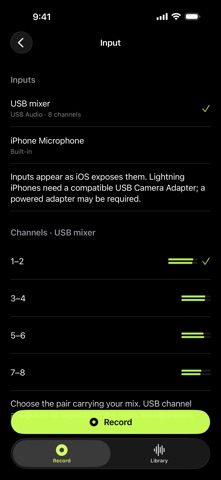
SET UP YOUR RECORDING Choose from the audio inputs and channel pairs exposed by iOS. Set your digital gain, choose stereo or mono, and save as WAV, AIFF or CAF. Select 44.1, 48 or 96 kHz and 16-bit or 24-bit audio, with 32-bit float available for WAV and CAF. Incoming audio is converted to your chosen file sample rate when needed.
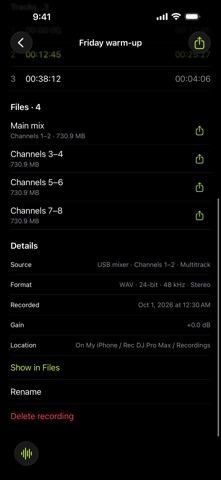
On inputs with more than two channels, turn on Multitrack to record every channel pair as its own file alongside your main mix. Depending on how your mixer routes its USB outputs, that can include individual channels or the mic, ready for editing later.
WATCH THE MIX Live level meters, peak hold and clipping indicators help you keep an eye on the signal. Add timestamped track markers without leaving the recording screen. The screen stays awake while recording, navigation stays locked, and stopping takes a deliberate hold.
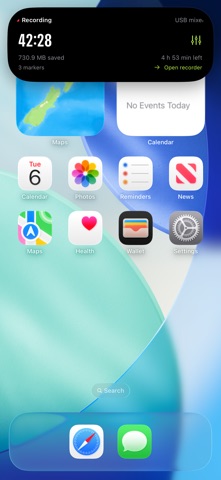
KEEP RECORDING IN THE BACKGROUND Recording continues when you switch apps or lock your iPhone, while the audio input remains available. A Live Activity shows the recording timer and status on the Lock Screen and on Dynamic Island on supported iPhones. If the USB input disconnects, recording pauses and picks up again automatically when the same input reconnects, even with your iPhone locked. It never switches to the microphone, and each gap is noted in the recording.
LISTEN BACK AND SHARE Play back your sets with a three-band waveform that shows lows, mids and highs scrolling under the playhead, plus a whole-set overview for seeking. Jump to markers and rename your sets. Your files are available in the Files app under On My iPhone > Rec DJ Pro Max > Recordings. Share a whole multitrack set at once or each file on its own.
LOCAL BY DEFAULT No account is required. Recordings are stored on your iPhone. The app has no advertising or analytics and does not upload your audio to a developer server.
BEFORE YOU CONNECT Requires iOS 26 or later and an audio input supported by iOS. Mixer routing, channel availability and adapter requirements depend on your equipment. Lightning iPhones need a compatible USB Camera Adapter, which may require external power. Live monitoring through the iPhone speaker is available only when iOS supports it with the selected USB input.
WAV and AIFF have file-size limits; choose CAF for longer sets. Available storage and system interruptions can limit recording duration. Record only audio you have permission to record and share.
Privacy: https://wmgx.io/dj-rec/privacy Terms: https://wmgx.io/dj-rec/terms
Brugernes bedømmelse
Log ind for at bedømme appen. Det vigtigste er, at du er ærlig.
Ingen bedømmelser endnu. Har du prøvet den? Giv den første bedømmelse.
Flere apps i kategorien Musik og lyd
De bedste nye apps i kategorien Musik og lyd denne uge KlingKlang – Control de AudioKlingKlang reúne todas las salas de tu sistema Sonos en una sola pantalla
 MonandaegMōnandæg is two field recorders that cannot leave anything alone
 Yul — Gugak Tuner & JangdanA tuner and rhythm trainer built for Korean traditional instruments
 MusiquitosMusiquitos es una app de música para niños con treinta canciones para cantar, bailar y…
 Harmonious: Microtonal musicHarmonious is a microtonal ambient instrument
 RitLoop: Slow Downer & LoopsStudy, practice and transcribe music by ear