
Remote Mirror: Desktop
Ikke gjort krav påRemote Mirror shows your Mac's screen on your iPhone or iPad, so you can see it and…
Af arcion Inc. · Værktøjer



Kort fortalt
Remote Mirror: Desktop shows a Mac's screen on an iPhone or iPad so the user can view and control it remotely, for example to check on tasks handed to an AI assistant or make a quick click. It requires the free Remote Mirror Host app on the Mac, a PIN for connection, and iOS 17 or macOS 14. One notable point: the connection stays encrypted end to end, and nothing passes through the developer's servers.
Resumé fra Debuts, baseret på app-siden i App Store.Om appen
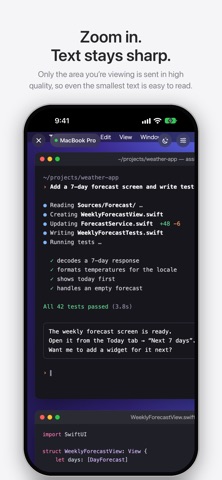
Remote Mirror shows your Mac's screen on your iPhone or iPad, so you can see it and control it. Check on tasks you've handed to an AI assistant, make a quick click, or type a few words — without walking back to your computer.
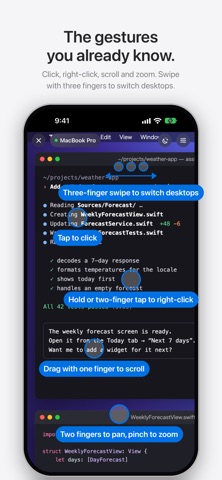
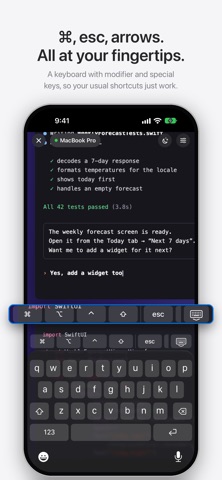
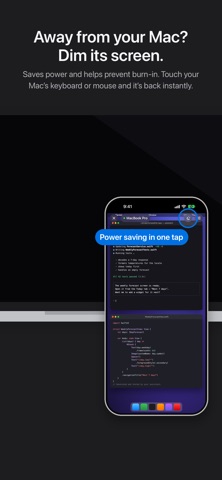
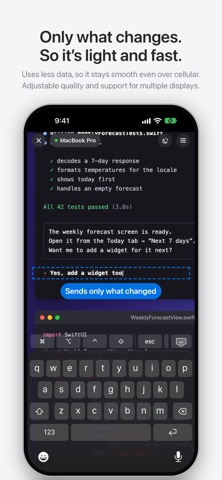
FEATURES • Text stays sharp when you pinch to zoom (the zoomed area is sent in high resolution) • Tap to click; touch and hold or two-finger tap to right-click • Drag with one finger to scroll, two fingers to pan • Three-finger swipe to switch desktops (left/right), open Mission Control (up) or App Exposé (down) • Tap a text field and the keyboard opens automatically; each character appears on your Mac as you type, including Japanese, Chinese and Korean input • Works with keyboard dictation — what you say is typed straight into your Mac • Special keys such as esc, tab and the arrow keys, plus the ⌘ ⌥ ⌃ ⇧ modifier keys • Fits your Mac's screen to your device's aspect ratio (windows that would spill over are tidied up automatically, even when you switch desktops) • Power saving: dims and hides your Mac's display; touch your Mac and it's back instantly • Only the parts that change are sent, so it uses little data and responds quickly • Encrypted with a key derived from your PIN • Available in 13 languages
HOW TO USE 1. Install the free "Remote Mirror Host" on your Mac (download it from arcion.jp/macremote) 2. Allow Screen Recording and Accessibility on your Mac 3. Choose your Mac in the app and enter the PIN shown in your Mac's menu bar
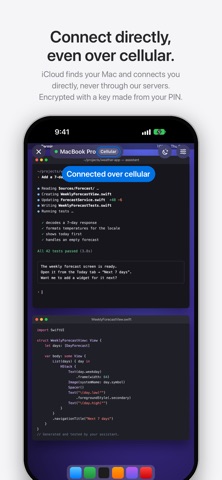
On the same Wi-Fi network it connects right away. With iCloud, it also connects directly over cellular (your Mac and device need to be signed in to iCloud with the same Apple Account). No Mac nearby? Try the in-app Demo to get a feel for it.
PRICING • Use every feature free for the first 3 days • After that, choose a monthly plan, a yearly plan or a one-time purchase • The in-app Demo is always free • The Mac app "Remote Mirror Host" is free
REQUIREMENTS • iPhone / iPad: iOS 17 or later • Mac: macOS 14 or later
PRIVACY Your screen and keystrokes travel only between your Mac and your device, and stay encrypted the whole way. Even over cellular, nothing passes through our servers. Connection details are stored only in your own iCloud, where no one else — including the developer — can see them. We don't collect any data.
TERMS & PRIVACY Terms of Use (Apple standard EULA): https://www.apple.com/legal/internet-services/itunes/dev/stdeula/ Privacy Policy: https://arcion.jp/macremote/en/privacy.html
Brugernes bedømmelse
Log ind for at bedømme appen. Det vigtigste er, at du er ærlig.
Ingen bedømmelser endnu. Har du prøvet den? Giv den første bedømmelse.
Flere apps i kategorien Værktøjer
De bedste nye apps i kategorien Værktøjer denne uge Drainly: Speaker CleanerMuffled speaker after a splash, rain, or a sweaty workout?
 Photo & PDF Resize: KBFile too large to upload?
 Arvectum Proxy LauncherArvectum Proxy Launcher is a network utility that routes your iPhone through a proxy you…
 Vodoalarm: vodostaji BiHVodoalarm javlja kad tvoja rijeka naglo raste, pa ne moraš stalno gledati vodostaje
 Dusty: Photo Cleaner PetYour camera roll's new pet
 FairAuth: AuthenticatorFairAuth creates the codes for two-step verification on iPhone and iPad