
SecureEyes: Shield all IP Cams
Ikke gjort krav påSecureEyes puts every IP camera you own on one private wall
Af Ashier de Leon · Værktøjer




Kort fortalt
SecureEyes is a utilities app that shows all your IP cameras on one screen, connecting directly over your own network via ONVIF or RTSP without accounts or cloud services. It is aimed at people who run cameras from several brands and want them in one place on iPhone, iPad, or Mac. One notable point is that motion events are recognised on the device with Apple Vision, and nothing is uploaded.
Resumé fra Debuts, baseret på app-siden i App Store.Om appen
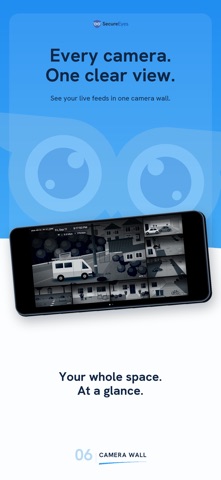
SecureEyes puts every IP camera you own on one private wall. It connects straight to ONVIF and RTSP cameras over your own network, so live video goes from the camera to your screen and nowhere else. No account. No cloud. No separate app for each brand.
ONE WALL FOR EVERY BRAND Discovery finds ONVIF cameras on your Wi-Fi, or add one by its address. Cameras from different makers sit side by side: Dahua, Reolink, Hikvision, TP-Link Tapo, and any camera or NVR that speaks ONVIF or RTSP. H.264 and H.265, main and sub streams.
BUILT FOR IPHONE, IPAD AND MAC A focus view on iPhone, a monitoring layout on iPad, and a video wall on the Mac. Grids from one camera to sixteen, feature-first and panorama layouts, drag to reorder, and paging when you have more cameras than tiles. A camera with two lenses gets two tiles.
EVENTS, ON YOUR DEVICE Motion becomes a timeline. Person, vehicle and animal are recognised on the device with Apple Vision, captions are written locally, and nothing is uploaded. Seven days of history by default, with the resolution and retention under your control. Save a still, share it, or export it to Photos, only when you choose to.
CLIPS Record a stretch of live video to a clip, keep it in the Clips library, then share or export it.
CONTROL THE CAMERA Pan, tilt and zoom on cameras that have it. Night vision and the spotlight. Encoder settings on cameras that accept them, so a camera that ships a 4K substream can be told to behave. Reboot from your phone.
PRIVATE BY ARCHITECTURE Camera passwords live in the Apple Keychain. There is no SecureEyes account, no analytics, no advertising and no tracking. Lock the app with Face ID or Touch ID.
MOVE AND SYNC Move your setup to a new device with a code or a QR, encrypted with a PIN. Keep cameras and settings in step across your devices with iCloud, off until you turn it on.
PLANS Free: three cameras, no account, nothing to pay. Standard: up to sixteen cameras, every layout, locations, device transfer, iCloud sync, biometric lock, and the camera controls. Buy once, or subscribe monthly. Pro: no camera limit, and the SecureEyes Hub. Buy once, or subscribe monthly.
THE SECUREEYES HUB, WITH PRO An always-on service on a machine you own, a Raspberry Pi or any Linux box. It pulls each camera once and serves every device from that, records continuously to a disk you own, and gives you a timeline you can scrub, with clips cut from footage it already holds. Watch from anywhere, sealed end to end to your own Hub, with no port opened on your router. Remote access is new in this release, and works when your Hub and device are online.
WORKS WITH Any camera or NVR that speaks ONVIF or RTSP. Tested against Dahua, Reolink, Hikvision and TP-Link Tapo. When a camera does not work, the app says which part did not, and the knowledge base at secureeyes.app says what we have tested ourselves.
The camera limit applies per device. Purchases restore on any device signed in with your Apple ID. Standard and Pro lifetime are one-time purchases. Standard and Pro monthly subscriptions renew automatically each month until cancelled in your App Store account settings.
Brugernes bedømmelse
Log ind for at bedømme appen. Det vigtigste er, at du er ærlig.
Ingen bedømmelser endnu. Har du prøvet den? Giv den første bedømmelse.
Flere apps i kategorien Værktøjer
De bedste nye apps i kategorien Værktøjer denne uge Drainly: Speaker CleanerMuffled speaker after a splash, rain, or a sweaty workout?
 Photo & PDF Resize: KBFile too large to upload?
 Arvectum Proxy LauncherArvectum Proxy Launcher is a network utility that routes your iPhone through a proxy you…
 Vodoalarm: vodostaji BiHVodoalarm javlja kad tvoja rijeka naglo raste, pa ne moraš stalno gledati vodostaje
 Dusty: Photo Cleaner PetYour camera roll's new pet
 FairAuth: AuthenticatorFairAuth creates the codes for two-step verification on iPhone and iPad