
Task Ticklet
Ikke gjort krav påTaskTicklet shows how long your work really takes
Af Vijay Kumar Ponraj · Produktivitet




Kort fortalt
Task Ticklet is a Mac productivity app that tracks how long tasks take, logs calls and meetings separately, and can sync with Jira. It is aimed at people who want a clearer record of their effort, including for sprint estimates and performance reviews. One notable feature is its handling of coding agent sessions from Claude Code and Codex, with logs kept on the device.
Resumé fra Debuts, baseret på app-siden i App Store.Om appen
TaskTicklet shows how long your work really takes. Start a task with one click, switch with another, and let automatic tracking capture the effort behind your day.
AUTOMATIC INTERRUPTION LOGGING Calls, meetings, and Slack huddles are logged separately from task time. Confirm calendar attendance with prefilled times, or add missed time manually. Automatic overlap handling prevents double counting. Audio is never recorded or transcribed.
STORY POINTS GROUNDED IN REAL EFFORT Use tracked task time and separately logged interruptions to understand effort and improve sprint estimates. TaskTicklet estimates story points spent without changing your Jira issues.
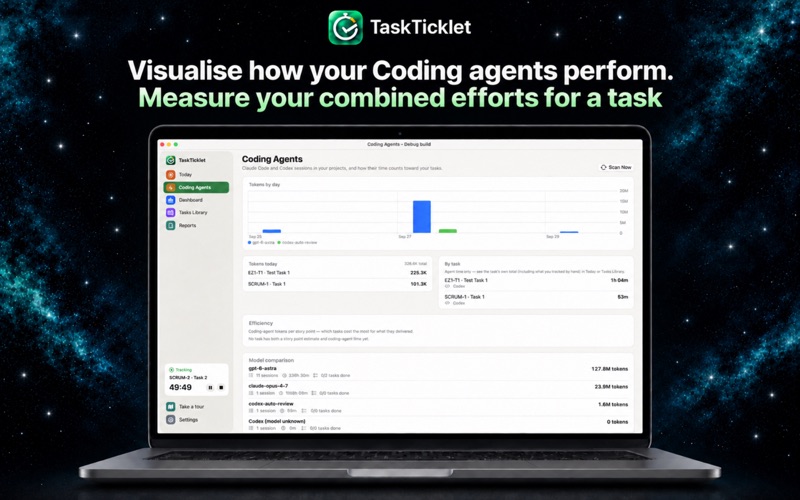
CODING AGENTS See Claude Code and Codex sessions, durations, token usage, and contributions to your tasks. Configure model prices to estimate costs and compare usage across models. Available with Pro. Agent logs stay local, and TaskTicklet never starts, stops, or controls your agents.
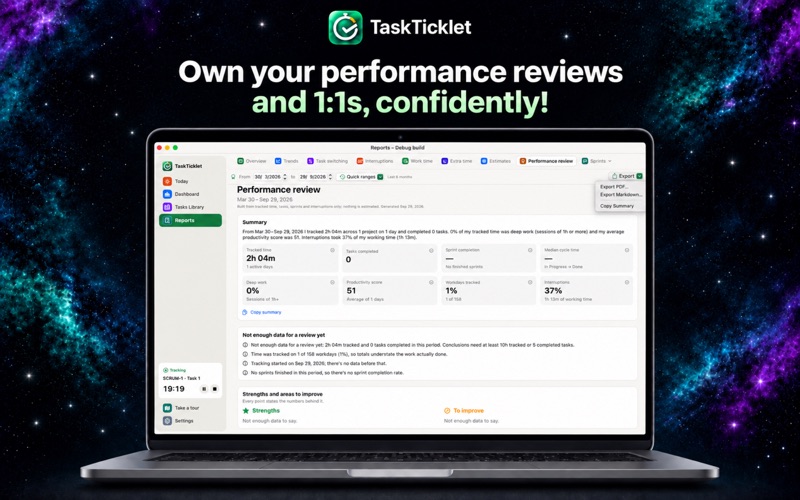
PERFORMANCE REVIEWS Turn six to twelve months of work into a first-person summary of your delivery, focus, growth, strengths, and saved wins. Export as PDF or Markdown for your next review or 1:1.
FOCUS AND WORK HABITS Understand focus sessions, task switches, pauses, and breaks with a daily productivity score based only on tracked data. Get gentle reminders when you forget to track or work too long without a break. Set your work window, daily target, and optional core hours. See extra time, overtime, and shortfalls clearly. Task tracking pauses when your Mac sleeps, locks, or shuts down, with recovery for crashes and missed sleep events. Breaks continue through sleep.
YOUR DAILY WORKFLOW Start, pause, resume, switch, and stop tasks from the menu bar. Search tasks, projects, and Jira keys without accidentally creating anything. Create projects, sprints, and tasks, or sync Jira issues. Organize work in List, Sprint Board, and Kanban views, with custom statuses and time-in-status tracking. The Today screen brings your timer, breaks, task picker, meetings, interruptions, and work log together. Start and finish your day with a summary and a win worth remembering.
DASHBOARD AND REPORTS Review tracked time, focus sessions, task switches, breaks, pauses, and active days for today or your sprint. Explore tasks by status and drill into the records behind each metric. Compare periods and explore dedicated Work Time, Extra Time, Interruptions, and Task Switching reports. Export reports as PDF or Markdown.
YOUR ROLE, YOUR RULES Choose whether activities count as work, interruptions, or neither. Adapt tracking to your role and the way you work.
INTEGRATIONS Connect Jira, Zoho Projects, Zoho Sprints, and Trello. Read Google, Outlook, Microsoft 365, and iCloud calendars through macOS Internet Accounts. Optional integrations include Calendly, Zoom, Slack, Zoho Calendar, Zoho Meeting, and Zoho Cliq.
PRIVATE BY DESIGN TaskTicklet runs inside Apple’s App Sandbox with a local database. Integration credentials stay in macOS Keychain. It never records audio or reads Slack message content. Records are retained for 18 months. Data stays on your Mac unless you connect an integration.
FREE AND PRO Free includes the full menu bar timer, one project with up to 15 tasks, Today, List, Sprint Board, Kanban, Dashboard overview, and reports for today and yesterday. Pro adds unlimited projects and tasks, custom report periods, Work Time and Extra Time reports, Jira sync, and Coding Agents. Try Pro free for 14 days, then pay $5.99/month or $49/year. The subscription renews automatically. Manage or cancel in Settings ▸ Subscriptions.
Brugernes bedømmelse
Log ind for at bedømme appen. Det vigtigste er, at du er ærlig.
Ingen bedømmelser endnu. Har du prøvet den? Giv den første bedømmelse.
Flere apps i kategorien Produktivitet
De bedste nye apps i kategorien Produktivitet denne uge ChickMark: Habit TrackerChickMark is a simple habit tracker for routines, goals, and reminders
 Dayflint: One Thing a DayToo many priorities?
 Snappy Do ItSix connected modes. One traceable journey.
 Fristo CAFMFristo is the app for Fristo CAFM, the facility management software
 UhWhat? Voice NotesCatch the thought before it disappears
- BeginAnywayMorning alarm for hard tasks: set one task, prove you started, build a streak