
TaskCue: Reminders & Notes App
Ikke gjort krav påTaskCue is the shared to-do list your whole team can see, so nothing slips your mind
Af Ryan Godfrey Gabriel Turnquest · ProduktivitetDerfor forventer vi det: A clear shared task list with thoughtful assignment, recurring chores and reminders that suits households and small teams.




Kort fortalt
TaskCue Reminders & Notes App is a shared to-do app where owners create and assign tasks and team members accept, snooze, or mark them done, all on one list everyone can see. It suits households, small cafés, shops, workshops, and office admin teams. It stands out for being free and funded by ads, with no subscription or paid tier.
Resumé fra Debuts, baseret på app-siden i App Store.Om appen
TaskCue is the shared to-do list your whole team can see, so nothing slips your mind.
Whether it's your household, a small café, a shop, a workshop or your first employees, TaskCue keeps the list of what needs doing, who is doing it, and what got done, in one place everyone can trust.
Owners create tasks and assign them. Members accept, snooze if they need a moment, and mark them done. Everyone sees the same list, updated the second anyone touches it.
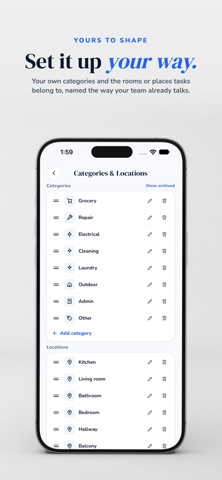
WHY OWNERS PICK TASKCUE • One shared list, not a chat. No more "did you do X?" every evening. • Assign to one person, several, or leave it up for grabs. • Filter the list to one person or one priority, or find the tasks nobody has picked up yet. • Recurring chores come back on their own, daily or weekly, on the days you choose. • Overdue and due-soon reminders push straight to the phone. • Categories and locations you tune to the team you have, not a template. • A morning digest of today's tasks, quietly delivered.
GETTING YOUR TEAM IN • Invite by email and they get a code that sets up their account. There is nothing for them to create. • Or share a link: it opens TaskCue with the code already filled in, and they tap Join. • A team code works for up to ten people for seven days. You can see how many uses are left and revoke it the moment you are done with it. • Already have an account? An invite is simply waiting on your home screen.
WHAT MEMBERS GET • Only your tasks, right on the home screen, with the ones due soonest at the top. • Accept, snooze, decline with a reason, or claim a task nobody was named for. • One tap to say a step is done, without moving the whole task. • One inbox of what changed, instead of chasing people to ask.
TEAMS THAT WORK IN TASKCUE • Households sharing chores between parents and older kids. • Small cafés and restaurants sharing prep, closing and stock checks. • Retail shops running restock, tills and visual merchandising. • Workshops and maintenance crews juggling repairs across bays. • Office admins running facilities, IT and supplies.
MORE THAN ONE TEAM Belong to several? Switch with a tap from the greeting or the You card in Settings. Each team keeps its own tasks, categories and locations, and remembers where you left off.
FREE, WITH ADS TaskCue is free and paid for by advertising. There is no subscription, no paid tier and nothing to unlock. Everyone in a team sees the occasional full-screen ad at a natural break, never more than a few a day, and never in a team's first day.
PRIVACY, PLAINLY No analytics inside the app. We do not sell your data. Your tasks live on the TaskCue server, Firebase Cloud Messaging carries push notifications to your phone, and Google AdMob serves the ads; where the law requires it, you are asked before any ad is loaded. You can delete your account, and everything we hold for it, from Settings at any time. The full policy is linked inside the app and on taskcue.195.26.245.156.sslip.io/privacy.
Get your team on the same page. Try TaskCue.
Brugernes bedømmelse
Log ind for at bedømme appen. Det vigtigste er, at du er ærlig.
Ingen bedømmelser endnu. Har du prøvet den? Giv den første bedømmelse.
Flere apps i kategorien Produktivitet
De bedste nye apps i kategorien Produktivitet denne uge ChickMark: Habit TrackerChickMark is a simple habit tracker for routines, goals, and reminders
 Dayflint: One Thing a DayToo many priorities?
 Snappy Do ItTurn photos, text and voice into tasks, plans and more.
 Fristo CAFMFristo is the app for Fristo CAFM, the facility management software
 UhWhat? Voice NotesCatch the thought before it disappears
- BeginAnywayMorning alarm for hard tasks: set one task, prove you started, build a streak