
TempoMate: Run Cadence BPM
Ikke gjort krav påThis metronome is one I first built for my family
Af 丽婷 谭 · Sundhed og fitness




Kort fortalt
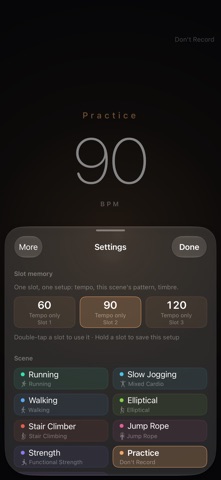
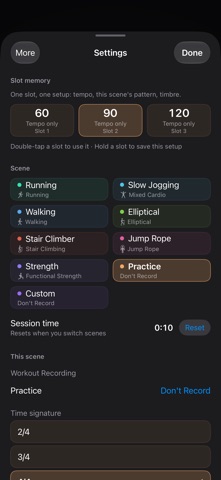
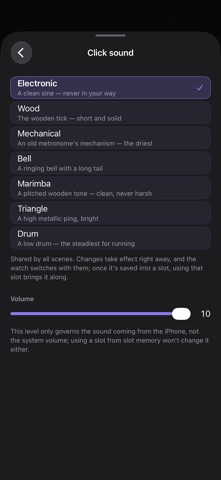
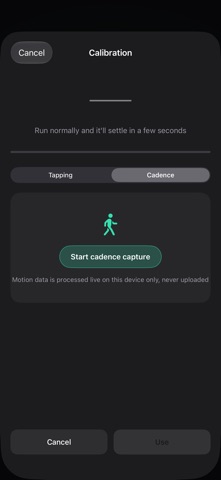
TempoMate: Run Cadence BPM is a metronome for runners and lifters, with a phone or watch remote and a wrist tap for the beat when the phone is away. It records sessions in Apple's Health app, including duration, heart rate, and active energy. It was first built by a developer for family use, and the app lets each scene count differently in Health.
Resumé fra Debuts, baseret på app-siden i App Store.Om appen
This metronome is one I first built for my family.
After a while you notice that exercise has a rhythm. When your stride goes, your breathing goes with it, and the run falls apart; hold your stride at a steady rate and your body lasts longer. Lifting is the same — lower over three counts, pause at the top for one, and the movement comes out clean.
So I started using a metronome. And I found that none of them are made for someone who is actually moving. Most are built for musicians: rows of knobs, a vocabulary of their own, and you have to stop, stand still and stare at the screen to change anything. But when you're running you can't look at a screen, and when you're lifting your hands are full. Plug in headphones and the click fights your music. And a watch has a screen that is always right there, and nobody had put a metronome on it.
What I wanted was simple: I start running and it knows how fast I'm going; I move on to the next set and it knows the count has changed; and when the phone isn't on me, I don't have to look at anything — a tap on the wrist tells me the beat is still there.
There wasn't one, so I built it. My family uses it and so do I, and I keep changing it — every time something feels wrong on the track, I come back and fix it.
———
■ The easiest way to use it: a remote on your wrist
Set everything up on the phone first — tempo, scene, whether to record it in Health — and after that the phone can stay in your pocket.
· Put a complication on your watch face, or keep it in the Smart Stack: one tap and the app is up, no hunting for an icon · While the phone is playing, the watch is the remote: tap to start or stop, turn the crown for tempo, swipe to change scene — without taking the phone out · When the phone is out of reach, it plays the click itself and taps the beat on your wrist, so you keep time without looking · All three setups work: phone on its own / watch on its own / both together. Move from one to the other mid-run and the beat carries on — nothing to restart
■ You don't have to log it afterwards
From the moment you start, the session is being written into the Health app: duration, heart rate, active energy (and speed for the activities that have one). Want a heart-rate check mid-run? Raise your wrist.
No need to open Apple's Fitness app, and no switching between apps. You decide what each scene counts as: Run as running, Slow Jog as mixed cardio, Practice as nothing at all.
Brugernes bedømmelse
Log ind for at bedømme appen. Det vigtigste er, at du er ærlig.
Ingen bedømmelser endnu. Har du prøvet den? Giv den første bedømmelse.
Flere apps i kategorien Sundhed og fitness
De bedste nye apps i kategorien Sundhed og fitness denne uge Orbit: Self-Care Habit TrackerYour healthy choices deserve more than a checkmark
 Wellbeing: Digital WellbeingBillions of people spend more time scrolling than they want to
 Court OrderCourt Order sorts out who plays next, so nobody has to
 Finn: Baby TrackerFinn is the calm, quick way to track your baby's feeds, sleep, diapers and pumping — and…
 Padel Score Tracker: PacoKeep padel score on your Apple Watch without looking at it
 DeskFlow: Workday MovementYou don't need another workout app