
uAlarm: Mission Alarm Clock
Ikke gjort krav påWake up for real
Af Javokhir Saporbaev · Sundhed og fitnessDerfor forventer vi det: A clever mission-based alarm with on-device camera checks, a wake-up re-check, and privacy-minded Screen Time blocking makes a compelling, well-explained debut.


Kort fortalt
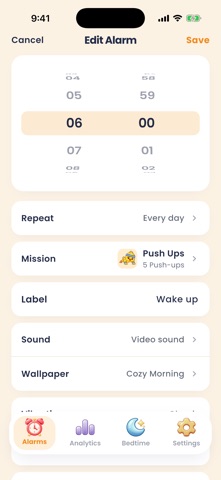
uAlarm: Mission Alarm Clock is a health-fitness alarm that stops only after you complete a task such as push-ups, squats, a QR or NFC tag scan, a math puzzle, or a photo of an item. The camera checks run on the iPhone, and nothing is uploaded. It stands out for its Bedtime feature, which blocks chosen apps in the evening and lets you unlock them through real exercise.
Resumé fra Debuts, baseret på app-siden i App Store.Om appen
Wake up for real.
uAlarm is a mission alarm clock. The alarm does not stop because you tapped a button — it stops when you finish a mission. By the time it is quiet, you are already out of bed.
ELEVEN WAYS TO PROVE YOU ARE AWAKE Push Ups, Squats and Jumping Jacks, counted by the camera. Scan Barcode / QR or NFC Tap, so you have to walk to the tag you put in the kitchen. Walk a set number of steps. Shake Phone. Math / Puzzles, Memory Game, Type a Phrase, and Photo of Item. The camera checks run entirely on your iPhone. No frame of video is uploaded, stored or sent anywhere.
A SCREEN AND A SOUND YOU CHOSE 70 alarm tones across five categories, from sirens to gentle. Video wallpapers that play with their own soundtrack, so the thing that wakes you is not a system dialog.
THE WAKE-UP CHECK Finished the mission and went straight back under the covers? uAlarm can ring again a few seconds later to make sure you stayed up. On or off, per alarm.
BEDTIME: BLOCK WHAT KEEPS YOU AWAKE Choose the apps that eat your evening and the hours they stay blocked. While a blocker is running, the only early way back in is real exercise — do the reps, earn the minutes. It is built on Apple's Screen Time, so uAlarm never sees what you do inside those apps.
YOUR MORNINGS, MEASURED Streaks, on-time rate, how long you actually take to get up, and how much you are sleeping.
In more than 30 languages.
UALARM PRO AND PREMIUM A free account keeps your alarms and your whole setup, but the alarm will not ring and app blocking stays off. Pro is a yearly subscription. Premium is a one-time purchase that never renews. Either one turns the alarm on, removes the limit on how many alarms you keep, and unlocks Bedtime.
Payment is charged to your Apple Account at confirmation of purchase. A subscription renews automatically unless it is cancelled at least 24 hours before the end of the current period; manage or cancel it in your Apple Account settings.
Terms of Use (EULA): https://www.apple.com/legal/internet-services/itunes/dev/stdeula/ Terms of Service: https://ualarm.app/terms Privacy Policy: https://ualarm.app/privacy
Brugernes bedømmelse
Log ind for at bedømme appen. Det vigtigste er, at du er ærlig.
Ingen bedømmelser endnu. Har du prøvet den? Giv den første bedømmelse.
Flere apps i kategorien Sundhed og fitness
De bedste nye apps i kategorien Sundhed og fitness denne uge Orbit: Self-Care Habit TrackerYour healthy choices deserve more than a checkmark
 Wellbeing: Digital WellbeingBillions of people spend more time scrolling than they want to
 Padel Score Tracker: PacoKeep padel score on your Apple Watch without looking at it
 DeskFlow: Workday MovementYou don't need another workout app
 Vigia: meds & family healthVigia keeps your health and your family's in order: a child, a parent, a partner
 Pinfall: Bowling StatsPinfall is the bowling score tracker for league bowlers who want to get better, not just…