
UpAI Clock
Ikke gjort krav påUpAI Clock brings wake-up missions and daily tasks into one place
Af Ali Tanriyar · Værktøjer

Kort fortalt
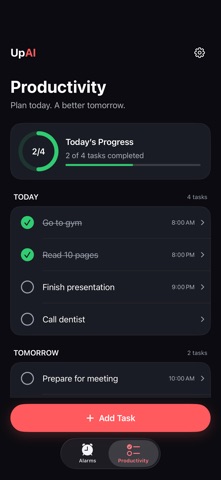
UpAI Clock combines wake-up alarms that require a mission, such as math, a QR code scan, object recognition, or typing, with a daily task planner. It suits people who want to get up on time and follow through on tasks, and it needs no account. Tasks can repeat on chosen days and stay open with deadline reminders until marked complete.
Resumé fra Debuts, baseret på app-siden i App Store.Om appen
UpAI Clock brings wake-up missions and daily tasks into one place. Start your morning with an alarm, then follow through on the things you planned to do.
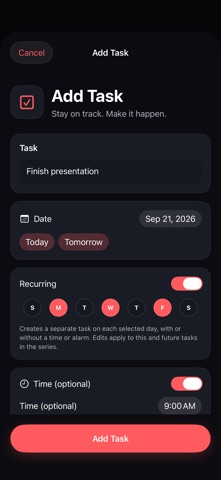
PLAN YOUR DAY Create tasks with a date and an optional time, note, and deadline alarm. See tasks grouped by day and track today's progress. Set recurring tasks for the days you choose, even without a time or deadline alarm.
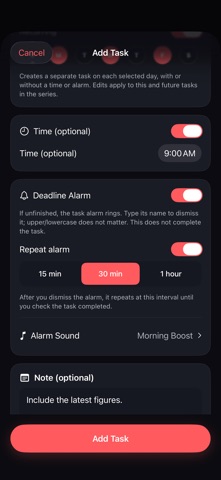
REMINDERS THAT KEEP TASKS OPEN For a timed task, choose an optional deadline alarm and repeat interval: 15 minutes, 30 minutes, or 1 hour. Typing the task text dismisses the current alert without completing the task. Mark the task complete separately to stop its repeat reminders.
WAKE-UP MISSIONS Choose how you complete an alarm: • Math — solve questions at your chosen difficulty. • QR Code — scan your saved code at a location you choose. • Object AI — use the camera to verify a selected everyday object. • Typing — type the displayed text; capitalization does not matter.
Create a one-time alarm for a selected date or choose recurring days. Personalize labels and sounds. Recovery options help you finish a mission if camera or network verification fails.
ACCOUNTLESS BY DESIGN No UpAI account or password is required. Your Apple Account manages purchases. With iCloud enabled, alarm definitions, your QR code, streak, history, and supported preferences can sync across your Apple devices. Imported alarms arrive disabled for you to enable on each device. Productivity tasks are stored on the device.
UPAI PRO Choose a monthly or annual auto-renewing subscription for Pro features. Available plans, local prices, trial eligibility, and renewal terms appear before purchase. Restore Purchases and Manage Subscription are available in the app. Cancel through Apple subscription settings.
Alarm delivery depends on iOS permissions and device settings. Task reminders use a limited scheduling window that refreshes when the app runs. Object AI requires camera permission and an internet connection; verification is subject to a daily usage limit.
Privacy: https://upai-support.pw8b9fd8nn.chatgpt.site/privacy Support: https://upai-support.pw8b9fd8nn.chatgpt.site/support Terms of Use (EULA): https://www.apple.com/legal/internet-services/itunes/dev/stdeula/
Brugernes bedømmelse
Log ind for at bedømme appen. Det vigtigste er, at du er ærlig.
Ingen bedømmelser endnu. Har du prøvet den? Giv den første bedømmelse.
Flere apps i kategorien Værktøjer
De bedste nye apps i kategorien Værktøjer denne uge Vodoalarm: vodostaji BiHVodoalarm javlja kad tvoja rijeka naglo raste, pa ne moraš stalno gledati vodostaje
 NadhirNadhir is an independent app
 Rokey: Romanian KeyboardType Romanian without worrying about diacritics
 Vibe Island: AI Agent MonitorVibe Island is a command center for the AI coding agents running on your Mac
 Private AuthenticatorPrivate Authenticator keeps your two-factor authentication codes on your own Apple…
 Photo Clean: Photo CleanupA crowded camera roll?