
Barcoder - Pro Barcode Scanner
Nicht beanspruchtBarcoder turns your iPhone into a fast, careful barcode and QR code scanner for retail…
Von The Ark Technology Limited · Produktivität



Kurz gesagt
Barcoder - Pro Barcode Scanner is a productivity app that turns an iPhone into a barcode and QR code scanner for retail, stock and deliveries. It offers log, count, checklist and find lists, rejects invalid EAN/UPC codes as they are scanned, and exports to CSV or TXT. It works entirely on the device with no account or sign-in.
Zusammenfassung von Debuts, basierend auf dem Eintrag im App Store.Info
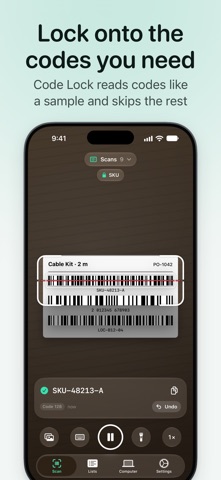
Barcoder turns your iPhone into a fast, careful barcode and QR code scanner for retail, stock and deliveries. Scan one code after another, lock onto just the codes you need, keep log, count, checklist and find lists, catch invalid EAN/UPC codes as you scan, and export everything to CSV or TXT. It all works on your iPhone alone — no account, no sign-in.
Scan One Code After Another • Continuous scanning adds each code as it's seen — or tap to capture on crowded shelves • Several codes in view? Take the one nearest the centre or all, in reading order • A red aim line reads only the 1D barcode it crosses • Four frame sizes up to full screen; codes outside it are never read • Reads EAN-13/8, UPC-A/E, Code 128, 39 and 93, ITF-14, Interleaved 2 of 5, Codabar, QR, Data Matrix, PDF417, Aztec, GS1 DataBar and more • Zoom, torch, tap to focus; pick codes from a photo or type them • A crisp scanner beep or softer sound, haptics and VoiceOver announcements
Code Lock: Only the Codes You Want • Learn a lock from a scanned sample or the padlock on the last scan, or set its type, characters, length and start by hand • Then only matching codes are accepted; others on a busy label are ignored • Free; switch saved locks on the scanner
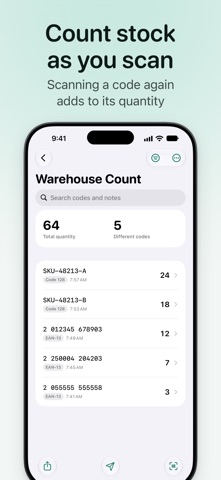
Lists for Every Job • Log lists: one row per scan, with time and an optional note • Count lists: scanning a code again adds to its quantity • Checklists: paste the codes you expect or import a CSV or TXT file (Barcoder Pro), then scan: found, missing, over or not on the list • Find lists: paste or type the codes to find, each with a note like a model or size, or take them from another list, or from a file (Barcoder Pro). Other codes are ignored; the card shows the note, "Found 23 of 50" and the same-note count. Copy Missing copies the rest • Duplicate warnings, search, filters, sorting, edits and archiving
Catch Mistakes as You Scan • Accept only EAN/UPC codes with a correct check digit, numbers only or your own pattern (Barcoder Pro), within a minimum and maximum length • Optional clean-up: uppercase letters, EAN-13 codes starting with 0 to UPC-A • Codes that fail are rejected with a reason and never reach your list
Export and Share • Export any list as CSV or TXT with your choice of columns; CSV opens cleanly in spreadsheets • Share via AirDrop, Mail, Files and more, copy all codes, or export all as one CSV file
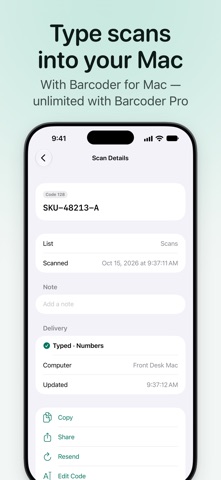
Type into Your Mac — Optional Get the free Barcoder for Mac at www.thearktech.com/barcoder and pair once with a QR code. Then every scan is typed into the app in use on your Mac, such as a spreadsheet or order system, followed by Enter, Tab or nothing. • Count lists and checklists send each code with its quantity at the end • With your Mac out of reach, scans wait on your iPhone and are typed once when you reconnect • Safety: no typing into password fields, terminal apps blocked by default, a cancellable countdown before batches, a pause shortcut • Works with Chinese input methods (Barcoder for Mac pastes the text) • Barcoder for Mac requires macOS 14 or later
Barcoder Pro (in-app purchase) Scanning, lists, checking and export on your iPhone are free and unlimited; typing up to 50 codes a day into one computer is free too. Barcoder Pro is available for 6 months, 1 year or lifetime, each a one-time purchase that never renews automatically. It adds: • Unlimited typing into your Mac • More than one paired computer • Checklist and find list import from CSV or TXT files • Custom accept patterns Bought it already? Settings › Barcoder Pro › Restore Purchases.
Private and Secure • No account, no ads, no analytics, no tracking; your lists stay on your iPhone • Scans go straight to your Mac over your local network, end-to-end encrypted — no servers in between, nothing sent to us • A new iPhone connects only after you type the 6-digit code it shows into your Mac; turn it off or remove it at any time
Barcoder requires iOS 17 or later. Questions or ideas? Email info@thearktech.com
Nutzer bewerten sie
Melde dich an, um diese App zu bewerten. Ehrlichkeit zählt.
Noch keine Bewertungen. Hast du die App ausprobiert? Gib die erste Bewertung ab.
Mehr Produktivität-Apps
Die besten neuen Produktivität-Apps dieser Woche ChickMark: Habit TrackerChickMark is a simple habit tracker for routines, goals, and reminders
 Dayflint: One Thing a DayToo many priorities?
 Snappy Do ItSix connected modes. One traceable journey.
 Fristo CAFMFristo is the app for Fristo CAFM, the facility management software
 UhWhat? Voice NotesCatch the thought before it disappears
- BeginAnywayMorning alarm for hard tasks: set one task, prove you started, build a streak