
Bookshelf:Books on your screen
Nicht beanspruchtLet your books linger
Von HUSEYIN CEM OZTURK · BildungWarum wir das erwarten: Bookshelf brings Goodreads shelves to life with handy widgets, reading stats, and fun ways to pick your next read.



Kurz gesagt
Bookshelf:Books on your screen is an education app that brings your Goodreads shelves to iPhone and iPad, showing current reads, finished books, and a year-in-books summary. It suits readers who want quick access to their shelves, with home screen widgets and Siri support. One detail stands out: the "blind date with a book" feature picks from your Want to Read shelf and reveals only clues like rating, era, and length.
Zusammenfassung von Debuts, basierend auf dem Eintrag im App Store.Info
Let your books linger.
The last page doesn't have to be the last time you see a book. Bookshelf brings your Goodreads shelves to life, keeping your current reads and recently finished favorites close by, even when they're ebooks.
Connect once, and your books are always within reach on your iPhone and iPad. You get a cleaner, calmer view of your shelves, and widgets that are ready to go.
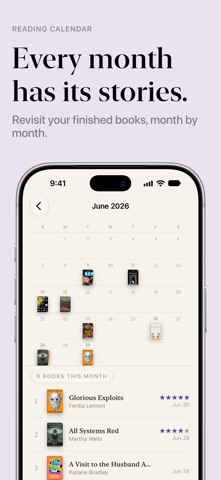
• Keep your books in view Browse what you're reading, what you've finished, and what's waiting next. Revisit your reading history with book covers and calendars of your finished reads, and mark the books you didn't finish.
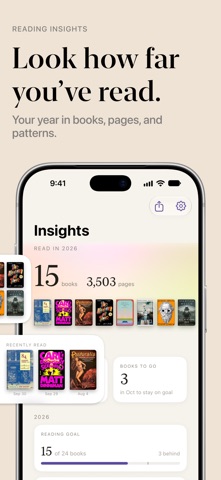
• Put your shelf on your Home Screen Choose widgets featuring your current reads, recently finished books, and your year in books. Display covers, book spines, or lists, with reading goals just a glance away. Tap a cover to jump straight to that book.
• Get to know your reading habits Explore books and pages read, favorite authors, ratings, streaks, and patterns across months and years. Set yearly book and page goals and follow your progress at your own pace.
• Find your next read Let the crystal ball pick from your Want to Read shelf, or try a blind date with a book: wrapped picks that only reveal clues like rating, era, and length. Narrow your choices to a quick read, a doorstopper, a classic, or something that's been waiting a while.
• Share your reading life Create images of individual books, monthly wrap-ups, yearly favorites, and reading stats. Make them yours with text, stickers, photos, and backgrounds.
• Rank the books you love Build book tier lists from ready-made presets, customize their labels and colors, and share your rankings with friends.
• Just ask "What's my reading streak in Bookshelf?" "Am I on track with my reading goal in Bookshelf?" Ask Siri about books and pages read, your current book, and more. It also works in Shortcuts, and every book is searchable in Spotlight.
Bookshelf requires a free Goodreads account with an accessible shelf RSS feed. It only reads your shelves and never changes your Goodreads account. Use another reading service? Let us know which one; we'd love to hear what you'd like us to support.
Bookshelf is an independent app and is not affiliated with or endorsed by Goodreads. Goodreads is a trademark of Goodreads, LLC.
Nutzer bewerten sie
Melde dich an, um diese App zu bewerten. Ehrlichkeit zählt.
Noch keine Bewertungen. Hast du die App ausprobiert? Gib die erste Bewertung ab.
Mehr Bildung-Apps
Die besten neuen Bildung-Apps dieser Woche FluencyToolShadow a native Japanese sentence, hear your own voice back, and get scored.
 YoMoo: Read & Shadow JapaneseYoMoo turns real Japanese writing into graded reading practice: news articles, Wikipedia…
 KeyswingLearn music notes, rhythm and piano through playful practice in a magical forest.
 Uncle Math Homeschool - 6 to 8No Math Fear, Uncle Math Is Here
 Chinese Stroke OrderLook up Chinese character stroke order — free web + apps
- Egzaminy ZawodoweDarmowa aplikacja do nauki do Egzaminów Zawodowych.