
Calendar Briefing
Nicht beanspruchtOpen your eyes, check one notification, and know how your day looks
Von SangGwon Park · ProduktivitätWarum wir das erwarten: Clear, well-written listing with a focused value proposition, thoughtful privacy-minded calendar controls, and a strong daily-briefing hook for busy people.



Kurz gesagt
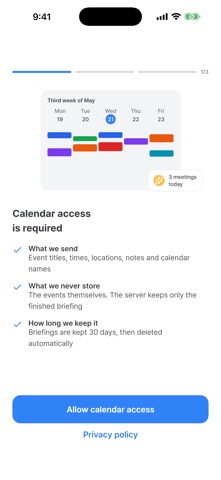
Calendar Briefing is a productivity app that reads the calendars already on your phone and sends a short, plain-language summary of your day at times you choose. It flags overlapping events and travel gaps, and keeps each briefing for 30 days. Aimed at people who want to know their schedule without scrolling a grid, it needs no account or sign-up.
Zusammenfassung von Debuts, basierend auf dem Eintrag im App Store.Info
Open your eyes, check one notification, and know how your day looks.
Calendar Briefing reads the calendars already on your phone and sends you a short, plain-language summary at a time you choose. No more scrolling through a grid to work out when your first meeting starts.
WHAT YOU GET, AND WHEN
A readable summary, not a grid "Three events today. Your first is the 10:00 design review." That is the whole point — a sentence you can take in half-awake, not a wall of coloured blocks.
Warnings that matter When two events overlap, or when you have twenty minutes to get across town between them, the briefing says so. These are the things you want to know before the day starts, not during it.
All your calendars, together Work, personal, shared, subscribed — every calendar account on your device is included. Pick exactly which ones count toward your briefing and leave the rest out. Subscribed calendars, the holiday and birthday ones, start switched off: they make a briefing long without making it more useful. Give a calendar a nickname — "Work", "Family" — and that is the name you see on every event.
Tonight or tomorrow, your call Get a briefing for today when you wake up, or for tomorrow the evening before so you can prepare. Turn on either, or both, at whatever times suit you.
The week ahead, on Sunday evening Turn on the weekly preview and the next seven days arrive in one briefing before the week starts. On or off, at the time you choose, like the others.
Not a good moment? Remind me in an hour The briefing lands while you are still in the shower. Tap "Remind in 1 hour" on the notification and it comes back when you can actually read it.
ON YOUR PHONE
Today and tomorrow, one tap apart The home screen holds both. Switch to tomorrow whenever you want to look ahead, instead of waiting for the evening briefing to arrive.
Look back whenever Every briefing is kept in the app for 30 days, so you can check what a past day held.
Nutzer bewerten sie
Melde dich an, um diese App zu bewerten. Ehrlichkeit zählt.
Noch keine Bewertungen. Hast du die App ausprobiert? Gib die erste Bewertung ab.
Mehr Produktivität-Apps
Die besten neuen Produktivität-Apps dieser Woche ChickMark: Habit TrackerChickMark is a simple habit tracker for routines, goals, and reminders
 Dayflint: One Thing a DayToo many priorities?
 Fristo CAFMFristo is the app for Fristo CAFM, the facility management software
- BeginAnywayMorning alarm for hard tasks: set one task, prove you started, build a streak
 DHUDEDHUDE Analityxs es la herramienta de gestión diaria para grupos de restauración y ocio…
 Unlocky: Training App BlockerLock the apps that eat your day