
Data Tap: Sensor Control
Nicht beanspruchtYour phone is full of sensors
Von Manifest Audio LLC · Musik und Audio




Kurz gesagt
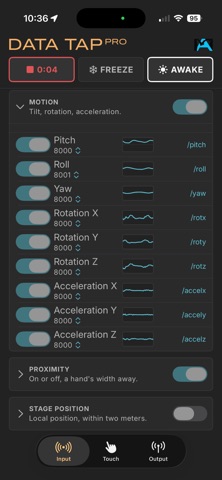
Data Tap: Sensor Control streams phone sensor readings over OSC to a computer on the same network, including motion, touch, microphone, camera, hand, face, depth, and GPS values. It is aimed at performers and creative makers who want live control signals, with values normalized from -1.0 to 1.0. One standout is that it can record every value to a CSV file in the Files app.
Zusammenfassung von Debuts, basierend auf dem Eintrag im App Store.Info
Your phone is full of sensors. Data Tap helps you put them to creative use.
Connect Data Tap to a computer on the same network and use OSC to stream what your phone senses: tilt, rotation and acceleration, fingers on a pad, loudness and pitch from the microphone, brightness and movement from the camera, hand position and pinch, facial expression, distance, and even GPS speed, heading and altitude.
Every value arrives the same way: a number from -1.0 to 1.0, on an address you can read and copy. Nothing needs to be guessed on the receiving end.
WHAT IT SENDS
Motion: tilt, rotation, acceleration Touch: three fingers, with latch Proximity: on or off, a hand's width away Microphone: loudness, pitch, timbre, onsets Camera: brightness, color, movement Hand pose: position, pinch, openness Face tracking: expression and head tilt, plus every ARKit blend shape Depth: continuous distance, out to three meters Stage position: where you have moved, within two meters GPS: speed, heading, altitude, position
SHAPED BEFORE IT LEAVES
Every value has its own smoothing to calm a busy signal, and jitter to excite a steady one. Two global sliders scale all of them at once. A graph on every row clearly displays the outbound signal.
ONE PORT EACH, OR ALL TOGETHER
Send everything to one port, or individual values to different ports, up to fifty above the main one, allowing different tools that bind their own port to each receive different signals from Data Tap at the same time.
RECORD IT
Start a recording and every value is written to a CSV file with an unbroken timeline, ready to open and reuse anywhere. Each CSV file lands in your Files app, yours to copy and use.
BUILT FOR A STAGE
Nutzer bewerten sie
Melde dich an, um diese App zu bewerten. Ehrlichkeit zählt.
Noch keine Bewertungen. Hast du die App ausprobiert? Gib die erste Bewertung ab.
Mehr Musik und Audio-Apps
Die besten neuen Musik und Audio-Apps dieser Woche KlingKlang – Control de AudioKlingKlang reúne todas las salas de tu sistema Sonos en una sola pantalla
 CalabiCalabi is a music toy you can see
 Fingertip Player: Feel MusicClose your eyes
 BANANA-1One banana
 Acord: Guitar Tuner, MetronomeAcord is a precise tuner and metronome for every musician
 MonandaegMōnandæg is two field recorders that cannot leave anything alone