
EaseShift: Staff Scheduler
Nicht beanspruchtEaseShift is a staff scheduling tool for store owners and team managers
Von 明然 夏 · ProduktivitätWarum wir das erwarten: Clear scheduling features, honest data notes, and a useful free tier make this a promising tool for store managers.




Info
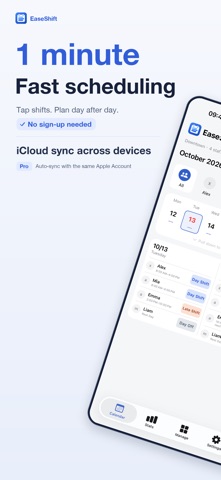
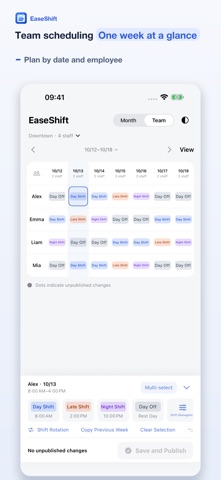
EaseShift is a staff scheduling tool for store owners and team managers. No account is required. Create locations, employees, and shifts, then build schedules directly from the calendar.
Key features: • Employee Calendar for planning one employee across an entire month • Team Schedule for viewing and editing a weekly grid by date and employee • Separate employees, shifts, drafts, and published schedules for each location • Recurring rotations, copy previous week, clear, undo, and publish tools • Custom shift names, times, types, and colors, including overnight shifts • Monthly or weekly schedule images for all employees or one employee • Statistics by location, month, employee, and shift • Light, dark, and multilingual interfaces • Optional Pro iCloud sync across devices using the same Apple Account • Daily data backups, updated when data changes and kept for 30 days • Brand name and logo, plus employee photos, phone numbers and email addresses
The free version supports one location and up to five active employees. A one-time Pro purchase unlocks unlimited locations and employees, complete statistics, brand management, iCloud sync, and schedule images without the promotional footer.
Data is saved locally first, with no EaseShift account required. Pro offers optional iCloud sync: data and images are stored in your own private iCloud database. Successfully synced data can be retrieved on devices using the same Apple Account. Deleting the app removes local data; unsynced changes cannot be restored from the cloud. Daily data backups exclude image files.
Terms of Use (EULA): https://www.apple.com/legal/internet-services/itunes/dev/stdeula/
Nutzer bewerten sie
Melde dich an, um diese App zu bewerten. Ehrlichkeit zählt.
Noch keine Bewertungen. Hast du die App ausprobiert? Gib die erste Bewertung ab.
Mehr Produktivität-Apps
Die besten neuen Produktivität-Apps dieser Woche ChickMark: Habit TrackerChickMark is a simple habit tracker for routines, goals, and reminders
 Dayflint: One Thing a DayToo many priorities?
 Snappy Do ItTurn photos, text and voice into tasks, plans and more.
 Fristo CAFMFristo is the app for Fristo CAFM, the facility management software
 UhWhat? Voice NotesCatch the thought before it disappears
- BeginAnywayMorning alarm for hard tasks: set one task, prove you started, build a streak