
Everyday Canvas : work and Edu
Nicht beanspruchtEveryday Canvas : work and Edu Turn everyday ideas into organized work
Von Trisphere Apps LLC · ProduktivitätWarum wir das erwarten: A promising all-in-one visual workspace for notes, diagrams and documents, with a clear free download and thorough feature descriptions.



Kurz gesagt
Everyday Canvas : work and Edu is a visual workspace for iPhone and iPad that brings notes, drawings, documents, diagrams and tasks together on one canvas. It suits people planning projects, studying or capturing meetings, and it works offline with local saving. One standout feature is automatic arrangement of connected flowchart nodes, supporting up to 300 nodes.
Zusammenfassung von Debuts, basierend auf dem Eintrag im App Store.Info
Everyday Canvas : work and Edu
Turn everyday ideas into organized work. Bring notes, drawings, documents, diagrams and tasks together in a flexible visual workspace for iPhone and iPad. Plan a project, prepare for class, capture a meeting or start with a blank canvas.
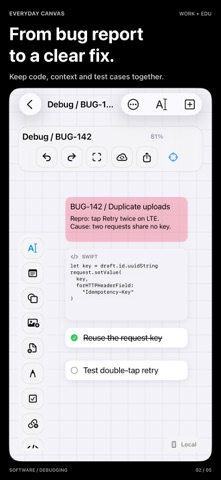
WRITE, ORGANIZE AND FOCUS Combine text, sticky notes, shapes, frames, lines, checklists, website links, code snippets and focus timers. Move, resize, rotate and duplicate objects. Undo and redo edits, search your canvas library, zoom to fit your work and use Focus Mode to reduce distractions. Review tasks across your canvases in one place.
BUILD FLOWCHARTS AND VISUAL PLANS Start with a flowchart, connect objects and label connections. Attached connectors follow their objects as you move them. Arrange connected diagrams automatically from top to bottom or left to right, with support for up to 300 connected nodes. Use templates for study, brainstorming, mind maps, projects, meeting notes, weekly planning, PDF workspaces and presentations. Turn a topic into a ready-to-edit planning layout generated locally on your device.
DRAW AND MAKE IT YOURS Create and edit freehand drawings with Apple Pencil support. Choose grid, dotted, ruled or plain backgrounds and customize colors. Adjust text size, bold styling, alignment, object rotation and opacity. Add labels to shapes. Rename, reorder, hide and lock layers to keep a busy canvas organized.
KEEP YOUR REFERENCES CLOSE Import images and PDFs, and read PDF pages beside your notes. Attach Word, Excel and PowerPoint files, plus RTF, plain text, Markdown and CSV documents. Preview supported files using the system document viewer and share originals with compatible apps. Document attachments are for reference and preview, not in-app Office editing. Individual document attachments support files up to 25 MB.
EXPORT AND SHARE YOUR WORK Import editable canvas archives and keep building on them. Export an editable canvas archive with its attachments, a PNG image, a PDF document or Markdown notes. Share through the system share sheet and keep separate copies of important work.
WORK OFFLINE, SYNC WHEN YOU CHOOSE Your canvases save locally, and local work does not require an account. With a cloud-enabled purchase, manually sync canvases, drawings and imported files through your private iCloud storage between devices using the same Apple Account. Conflicting edits are preserved as separate copies. Sync requires internet access and available iCloud storage, with a 50 MB archive limit per canvas. Deletions also sync, so iCloud sync is not an archival backup. Live collaboration and online AI services are not included.
MADE FOR WORK AND LEARNING Build a study board with source documents, questions and your own notes. Map a process with labeled shapes and connections, or turn meeting notes into action items. Keep project references, decisions and tasks on the same canvas instead of scattering them across separate files. Use frames to group related ideas, colors to distinguish topics and timers to set aside focused work sessions. Start from a template, rearrange it around your needs and revisit the same workspace as your project develops. Keep original documents beside the ideas and actions they inspire.
OPTIONAL PAID FEATURES Drawing and locally generated planning layouts require Pro access. The local-only lifetime option is a one-time purchase without cloud sync. Monthly, annual and lifetime Pro options include iCloud; a separate lifetime cloud upgrade provides cloud access. Prices, included features and billing periods appear before purchase. Subscriptions renew automatically unless canceled in Apple Account settings. Restore purchases in the app.
The app interface is currently in English.
Website: https://www.trisphereapps.com Support: https://www.trisphereapps.com/contact Privacy Policy: https://www.trisphereapps.com/privacypolicy © 2026 Trisphere Apps LLC
Nutzer bewerten sie
Melde dich an, um diese App zu bewerten. Ehrlichkeit zählt.
Noch keine Bewertungen. Hast du die App ausprobiert? Gib die erste Bewertung ab.
Mehr Produktivität-Apps
Die besten neuen Produktivität-Apps dieser Woche ChickMark: Habit TrackerChickMark is a simple habit tracker for routines, goals, and reminders
 Dayflint: One Thing a DayToo many priorities?
 Snappy Do ItTurn photos, text and voice into tasks, plans and more.
 Fristo CAFMFristo is the app for Fristo CAFM, the facility management software
 UhWhat? Voice NotesCatch the thought before it disappears
- BeginAnywayMorning alarm for hard tasks: set one task, prove you started, build a streak