
Experto: Organize o que quiser
Nicht beanspruchtOrganize anything, effortlessly
Von Midiatools Agência Digital Ltda - ME · ProduktivitätWarum wir das erwarten: Clear value, a thorough description and strong iPhone integration make this a promising team productivity app.




Kurz gesagt
Experto is a productivity app for organizing any kind of work or personal list, from client requests and meeting agendas to grocery lists and trips. Team members pull tasks onto their own lists, deadlines turn red when late, and AI features stay off until an admin enables them. It suits teams and households, and it stands out for its Pull and Push task handoffs.
Zusammenfassung von Debuts, basierend auf dem Eintrag im App Store.Info
Organize anything, effortlessly.
The client's request, the meeting agenda, the grocery list: in Experto, everything becomes a list, and every list shows what's left and who has it. Nobody has to hand out tasks or ask in the group chat who took the request.
EACH PERSON PULLS WHAT THEY'LL DO With Pull and Push, nobody has to pick an owner for every task. Swipe a task to the right and Pull it: it lands in your day, and the team's list shows your dot on it. Finish it, and everyone sees it done. Ran out of time? A Push hands the task back to the team, without breaking anything.
RIGHT AT HOME ON IPHONE Touch and hold a task to open its menu: copy, duplicate, select or delete. Swipe left to copy or delete. Select several and complete, move or duplicate them all at once. Touch and hold the Experto icon on your Home Screen to add a task, see what's due today or open your messages. Your iPhone gives haptic feedback when you complete, Pull or Push, and notifications arrive with Experto's own sound.
DEADLINES THAT WARN YOU Every task has a start, a deadline and an estimate. What's late turns red before anyone has to chase it.
CONNECTED LISTS Finish a task in one list and it moves on to the next by itself: requests, in progress, approval. The work flows without anyone pushing it.
NOTICES WITH READ RECEIPTS A notice reaches the whole team at the same time, and you see who has read it. Important ones stay on screen until they're read, and everyone can reply with a reaction.
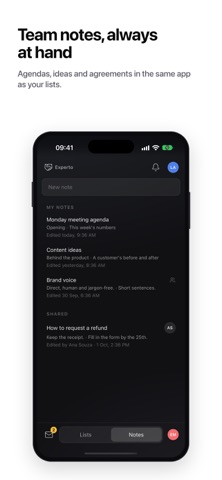
NOTES NEXT TO YOUR LISTS Agendas, ideas and agreements in the same app as your tasks, just for you or for the whole team. Photos and files stay attached to the task itself. Share a task or a note with the iPhone share sheet.
A SUB-ACCOUNT FOR EVERY CLIENT, STORE OR DEPARTMENT Turn on sub-accounts and use the name your business already uses: clients, projects, units, stores, sites or departments. People from outside join as guests, see only their own sub-account, get the notices and complete items with a check.
AI DOES ONLY WHAT YOU ALLOW Through Experto MCP, the AI assistant you already use turns your meeting agenda into tasks, in the right list, and tells you what's late. AI connections start turned off, the AI only sees what you see, and it never deletes anything. Admins decide who can connect and whether the AI can only read or also edit.
FOR YOUR PERSONAL LIFE, TOO Household bills, the grocery list, your studies and your next trip, all in one place. Share a list with the people you live with, and each person checks off what they did.
THE SAME WORK, WHEREVER YOU ARE Every change shows up for everyone right away, on iPhone, on the web, on Mac and on Windows. On the computer, a tab on the edge of the screen opens the panel with one click, on top of any app. On the web, the Organizer lays out the team's week, list by list or person by person.
Nutzer bewerten sie
Melde dich an, um diese App zu bewerten. Ehrlichkeit zählt.
Noch keine Bewertungen. Hast du die App ausprobiert? Gib die erste Bewertung ab.
Mehr Produktivität-Apps
Die besten neuen Produktivität-Apps dieser Woche ChickMark: Habit TrackerChickMark is a simple habit tracker for routines, goals, and reminders
 Dayflint: One Thing a DayToo many priorities?
 Snappy Do ItSix connected modes. One traceable journey.
 Fristo CAFMFristo is the app for Fristo CAFM, the facility management software
 UhWhat? Voice NotesCatch the thought before it disappears
- BeginAnywayMorning alarm for hard tasks: set one task, prove you started, build a streak