
Finance Three Family Budget
Nicht beanspruchtShared money, without the noise Finance Three is a calm budget you keep together, with a…
Von Oleksandr Uiutnov · FinanzenWarum wir das erwarten: A thoughtful shared-budget app with clear free and Plus value, well-described features, and a calm, focused approach to personal finance.



Kurz gesagt
Finance Three Family Budget is a shared budget app where a partner or whole family records income, spending and savings together through iCloud. Logging spending is free, while the Plus subscription adds shared entry, envelopes and monthly planning. Its standout feature is that every entry appears on every phone in the budget, and each person keeps a separate private budget.
Zusammenfassung von Debuts, basierend auf dem Eintrag im App Store.Info
Shared money, without the noise Finance Three is a calm budget you keep together, with a partner or the whole family: what came in, what went out and what you set aside The facts, not a verdict Logging spending is free, Finance Three Plus does the rest
One budget for everyone (Plus) Invite as many people as you need via iCloud and keep a family budget together Every entry shows up on every phone in the budget One Plus covers up to six people in your Apple Family Sharing group Everyone you invite can see the entries without Plus Adding entries needs Plus, your own or shared through Family Sharing Each of you still has a personal budget, separate and private
A few seconds a day (free) Type the amount, pick from over a hundred icons and add a note if you like Add and subtract on the pad to total a receipt A Home Screen or Lock Screen widget opens straight to the amount pad In the calendar, add an entry for a future day, move it or swipe to edit it Each month shows how much came in and how much you spent
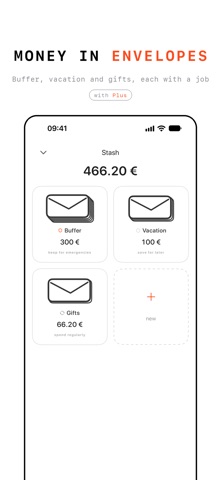
Envelopes (Plus) Spend regularly: everyday money, and what is left rolls over Save for later: trips, gifts, repairs Keep for emergencies: a calm reserve you can still use Give any envelope a target and see how many months are left
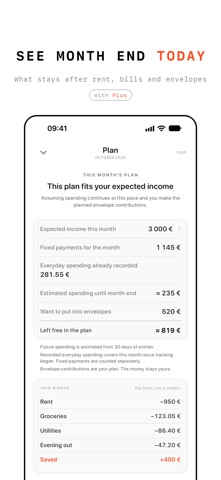
A plan, not a lecture (Plus) Your month on one page: income, fixed payments, everyday spending, envelopes and what stays unallocated The main screen shows how much you can still spend today Fixed payments fall on a set date, any day of the month, or every few days, weeks or months If you like, a reminder arrives the day before a payment with a set date The day before and on the day, a quiet line on the main screen shows what is due After your first week the plan knows your everyday pace and shows how the month is likely to end A monthly mirror shows where the money went and what you set aside A breakdown by category shows your spending as a donut and a list with percentages The plan never moves money on its own
Yours No sign-up, no ads, no tracking Your records live on your phone and in iCloud Back up to the Files app whenever you like 31 currencies, 11 languages
Finance Three Plus Everything marked Plus comes with a monthly or yearly subscription that renews automatically Cancel anytime in Settings › Apple Account › Subscriptions If Plus ends, nothing you created is deleted and it all stays visible Envelopes and fixed payments pause until Plus is back, and in a personal budget money in an envelope can always go back to your balance
Privacy: https://zhorzhua.studio/finance-three/privacy.html Terms of Use (EULA): https://www.apple.com/legal/internet-services/itunes/dev/stdeula/
Nutzer bewerten sie
Melde dich an, um diese App zu bewerten. Ehrlichkeit zählt.
Noch keine Bewertungen. Hast du die App ausprobiert? Gib die erste Bewertung ab.
Mehr Finanzen-Apps
Die besten neuen Finanzen-Apps dieser Woche NjukiYour rent should do more than pay for where you live
 Qwiky AIQuiky AI helps you understand and organise your everyday finances in one clear place
 Inflation WatchInflation Watch turns official price data into plain English
 CashbellHear every sale
 uOwe: Split Bills & BudgetuOwe keeps shared costs fair and your own money clear
 Debtless: Debt-Free by WhenYou are about to know when you will be free