
Fold Protractor: Angle Finder
Nicht beanspruchtFold Protractor turns iPhone Duo into a bevel gauge
Von Special Glasses LLC · DienstprogrammeWarum wir das erwarten: The description clearly explains a focused, useful angle tool and honestly notes its limits, which builds trust for a paid utility.




Kurz gesagt
Fold Protractor: Angle Finder turns a folding iPhone into a bevel gauge that reads hinge angles, and on other iPhones it works as a level with rulers along the edges. It suits people who need to check angles or measure things with their phone. One standout detail is a target mode where the screen turns red until the chosen angle is reached, then green.
Zusammenfassung von Debuts, basierend auf dem Eintrag im App Store.Info
Fold Protractor turns iPhone Duo into a bevel gauge. Open the phone, set it into a corner or against two edges, and read the hinge angle in big numbers.
• Inside or outside angle • Hold to freeze the reading • Calibrate at flat (180°) or at 90° • Haptic ticks every 45° • Target: pick an angle. The screen is red until you reach it, then green.
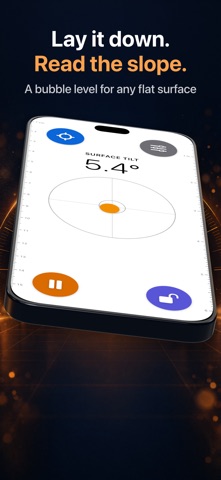
On every other iPhone, and on a folded Duo, it works as a level. Stand the phone on an edge to read its rotation, or lay it flat to see the surface tilt with a bubble. Lock sets the current angle as zero, so you can measure from any edge.
In level mode, rulers run down both long edges: centimeters on the left, inches on the right. They count from the top of the phone itself, not the screen, and are set for each iPhone model from Apple's published measurements. On iPhone Duo, open the phone and rulers also run along the long edges of the inner display: inches on top, centimeters below.
• Turn off Lock Ruler to Edge in Settings, hold a finger on a ruler, and slide the phone to measure things longer than the phone. • Adjust Rulers lines the marks up with a real ruler or tape, for a case or a small error. Touch and hold for a magnifier.
Readings and ruler marks are approximate. Phones and cases vary. For work that must be exact, check against a real tool.
Pay once. No ads. No subscription. No account. Nothing leaves your phone.
Built for iPhone Duo. Works on every iPhone.
Nutzer bewerten sie
Melde dich an, um diese App zu bewerten. Ehrlichkeit zählt.
Noch keine Bewertungen. Hast du die App ausprobiert? Gib die erste Bewertung ab.
Mehr Dienstprogramme-Apps
Die besten neuen Dienstprogramme-Apps dieser Woche Vodoalarm: vodostaji BiHVodoalarm javlja kad tvoja rijeka naglo raste, pa ne moraš stalno gledati vodostaje
 NadhirNadhir is an independent app
 Rokey: Romanian KeyboardType Romanian without worrying about diacritics
 Vibe Island: AI Agent MonitorVibe Island is a command center for the AI coding agents running on your Mac
 Private AuthenticatorPrivate Authenticator keeps your two-factor authentication codes on your own Apple…
 Photo Clean: Photo CleanupA crowded camera roll?