
LumaCadence: Light Flicker
Nicht beanspruchtKeep a repeatable record of your indoor lighting
Von 青林 刘 · Dienstprogramme


Kurz gesagt
LumaCadence: Light Flicker uses the iPhone rear camera to sample about five seconds of brightness variation from indoor lamps, then reports detected variation, no significant variation, or an inconclusive result. It saves measurements by room, lamp and brightness setting so the same lamp can be compared across dimming levels. Camera frames are processed on the device and not saved as photos or video.
Zusammenfassung von Debuts, basierend auf dem Eintrag im App Store.Info
Keep a repeatable record of your indoor lighting.
LumaCadence uses your iPhone rear camera to sample about five seconds of brightness variation. Screen indoor lamps for detectable fluctuations and compare the same lamp at different dimming settings. All features are free, with no ads, in-app purchases or account required.
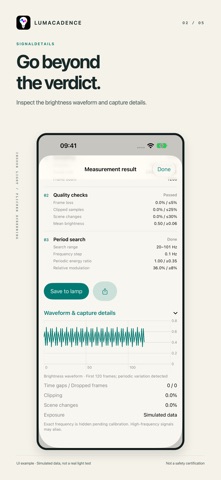
SEE THE EVIDENCE Results distinguish detected variation, no significant variation detected in this sample, and an inconclusive measurement. Inspect frame rate, sampling duration, relative modulation depth, exposure, frame loss and scene changes.
FOLLOW THE PROCESS See a live brightness waveform while framing a light. The report shows sampling, quality checks and periodic signal analysis, with additional waveform and capture details. Cancel a capture at any time.
REVISIT EACH LAMP Save measurements by room, lamp and brightness setting. Compare records for one lamp, reopen full reports, share a summary or export CSV.
ON-DEVICE PROCESSING Camera frames are processed locally and are not saved as photos or video. The app does not upload your measurements. You control saving, deletion and sharing.
REQUIREMENTS AND LIMITATIONS Requires an iPhone rear camera with a supported high-frame-rate format. 240 fps offers fuller sampling; lower frame rates provide limited screening. Aim at a lampshade or a surface lit by one lamp and keep the phone steady. Avoid direct glare and mixed light sources.
Camera sampling cannot reliably cover every flicker frequency. Exposure, dropped frames, rolling shutter and high-frequency PWM aliasing can affect results. A quiet result does not prove that a light is flicker-free. Exact frequency values are not shown before independent calibration. This is not a medical, eye-safety or product certification tool. The current version focuses on indoor lamps and has no dedicated screen measurement mode.
Available in English and Simplified Chinese. The app follows your system or per-app language setting.
Nutzer bewerten sie
Melde dich an, um diese App zu bewerten. Ehrlichkeit zählt.
Noch keine Bewertungen. Hast du die App ausprobiert? Gib die erste Bewertung ab.
Mehr Dienstprogramme-Apps
Die besten neuen Dienstprogramme-Apps dieser Woche Vodoalarm: vodostaji BiHVodoalarm javlja kad tvoja rijeka naglo raste, pa ne moraš stalno gledati vodostaje
 Rokey: Romanian KeyboardType Romanian without worrying about diacritics
 Vibe Island: AI Agent MonitorVibe Island is a command center for the AI coding agents running on your Mac
 Private AuthenticatorPrivate Authenticator keeps your two-factor authentication codes on your own Apple…
 Photo Clean: Photo CleanupA crowded camera roll?
 Songbird AlarmWhat if the morning didn't have to start with a loud noise?