
miolo: Time Tracker & Journal
Nicht beanspruchtWhere did your day go?
Von Fuzalabs LTDA · ProduktivitätWarum wir das erwarten: Its manual time blocks and clear timeline make tracking your day simple, without the pressure of constant timers.




Kurz gesagt
miolo: Time Tracker & Journal is a productivity app where you log blocks of time after the fact, with a start, end, category and optional title, rather than running a timer. Entries build a daily timeline, and charts show time by category over periods up to 12 months. It is aimed at freelancers, students, home workers and people building habits, and it lets you set goals such as weekly focus hours, then marks them as met, in progress, missed or over the limit.
Zusammenfassung von Debuts, basierend auf dem Eintrag im App Store.Info
Where did your day go? miolo answers without a timer to start and forget. When you have a minute, you write down a block: when it started, when it ended, what it was. The day fills in as a timeline, one block after another, on a 15-minute grid.
It is a time tracker and daily log for people who are tired of apps that want attention all day. It records what happened, not what you planned. It shows where the time went and what you meant to do, without distractions.
WHO IT IS FOR • Freelancers, students and people working from home who want to track hours without a spreadsheet. • Anyone building habits or keeping routine goals with an honest activity log. • Anyone who tried a stopwatch time tracker and gave up on day two.
RECORD THE DAY • Start, end, category. A title if you want one. • Or hold and drag over an empty stretch of the day: it opens a block with the start and end filled in. • Categories and subcategories are yours to name: Work › Focus, Personal › Family, Break › Coffee. • Save a block, or save and keep going through the day. • Edit or delete any block later.
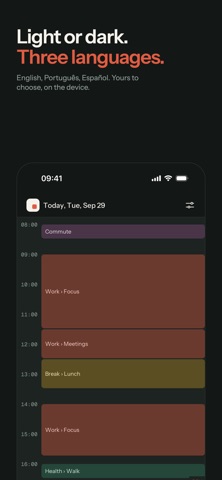
SEE THE DAY • Every block sits at the hour it happened and shows how long it lasted, with the present moment marked. • A summary of the day by category greets you when you open it, then steps aside. • Go back to any day.
SEE WHERE THE TIME WENT • The last 7 days, 30 days, 12 months, or any stretch you pick. • Your time by category, as a pie. Tap a slice to open its subcategories. • Each day drawn as one line, so you see when the time was spent, not only how much. • The activity list shows what you did over up to 60 days, filtered by category or searched by title.
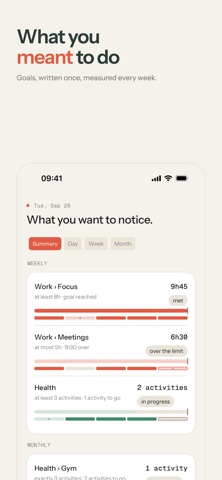
NOTICE WHAT YOU MEANT TO DO • A goal is an intention: at least 8 hours of Focus a week, at most 5 hours of Meetings, exactly 3 workouts a month. • miolo measures it against what you actually recorded and says it plainly: met, in progress, missed, over the limit. • Every goal keeps its history.
TWO REMINDERS, NOT TWENTY • They start off. Turn them on and there are two: one at midday, one in the evening, so a forgotten day still gets recorded. If you were just in the app, they stay quiet.
YOURS ALONE • Start without an account: your records stay tied to the device. • Sign in with Google or Apple when you want them to follow you to your next phone. • Export your activities as a spreadsheet (CSV) and keep them wherever you like. • Light, dark or system. English, Portuguese and Spanish. • Delete your account, and everything in it, from inside the app.
No ads. No feed. No streaks to keep alive. A productivity app that does not compete for your attention.
Start today: the first block takes ten seconds. Your time, without noise.
Nutzer bewerten sie
Melde dich an, um diese App zu bewerten. Ehrlichkeit zählt.
Noch keine Bewertungen. Hast du die App ausprobiert? Gib die erste Bewertung ab.
Mehr Produktivität-Apps
Die besten neuen Produktivität-Apps dieser Woche ChickMark: Habit TrackerChickMark is a simple habit tracker for routines, goals, and reminders
 Dayflint: One Thing a DayToo many priorities?
 Fristo CAFMFristo is the app for Fristo CAFM, the facility management software
- BeginAnywayMorning alarm for hard tasks: set one task, prove you started, build a streak
 DHUDEDHUDE Analityxs es la herramienta de gestión diaria para grupos de restauración y ocio…
 Fillerless: Teleprompter CoachFillerless is a teleprompter that follows your voice and then tells you how you spoke