
Moss: Private Journal & Diary
Nicht beanspruchtMoss is a private journal and diary that stays yours
Von Abhishek Agarwal · Lifestyle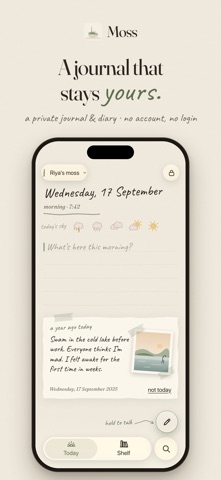




Kurz gesagt
Moss is a private journal and diary for iPhone, iPad and Mac that requires no account and syncs through your own iCloud. It lets you combine text, photos, voice notes and sketches on a page, track your mood, and search or ask questions of everything you have written. The app stands out for its "no streaks" approach, where a quiet day still counts as a page.
Zusammenfassung von Debuts, basierend auf dem Eintrag im App Store.Info
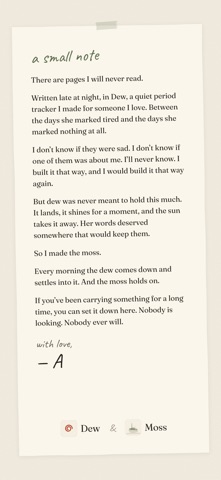
Moss is a private journal and diary that stays yours. No account, no login, no sign-up. Your pages live on your iPhone and in your own iCloud, and not even we can read them.
Remember the diary with the little lock on it? Moss is that, grown up, and no one else has the key.
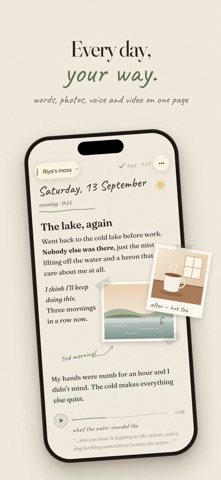
EVERY DAY, YOUR WAY • Words, photos, videos, stickers and voice, placed anywhere on the page, like a scrapbook that remembers • Rich text, lists, checklists and highlights • Write the whole page in a handwriting font, on the paper and ink you like • Gentle prompts for the days you don’t know where to begin • Sketch with Apple Pencil on iPad
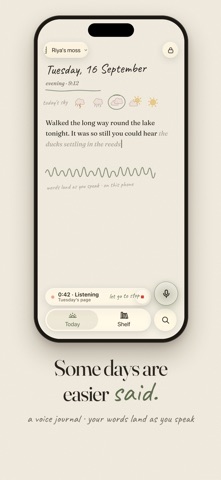
SOME DAYS ARE EASIER SAID • Hold to talk: keep the voice note, and watch your words land on the page as you speak • Your voice is turned into words on your iPhone, never on a server • Tell Siri “Add a line to Moss”, or start a page from a widget, Control Center or the Action button
HOW WAS THE SKY TODAY? • Give each day a little sky, sunny to stormy, and the words for how it felt • Watch your moods drift across the weeks • If you like, save your State of Mind to Apple Health, and see sleep, steps, daylight and mindful minutes beside your pages
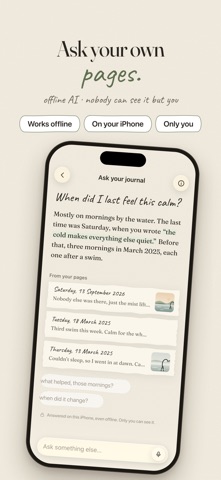
YOUR YEARS COME BACK • On this day, a weekly look back, and the pages you kept • Past years sit on a shelf, like books • Threads gather your pages by #tag or theme • Ask your pages: ask anything you’ve ever written and get an answer from your own words, worked out on your iPhone, even offline • Search everything you’ve ever written
NOBODY READS IT. NOT EVEN US. • No account, no login, no sign-up • Your pages live on your device and in your own iCloud, synced across your iPhone, iPad and Mac. Nobody at Moss can read them • Lock Moss with Face ID or your own Moss code • Keep several journals; give any one its own code, or tuck it away
REST DAYS COUNT No streaks, ever. A quiet day is still a page. Moss is journaling without the guilt.
BRING YOUR OLD PAGES • Import your journal from Day One, Apple’s Journal app, Markdown or plain text • Scan a handwritten page from a paper diary, and Moss reads the words
MOSS IS FREE No ads, no account, nothing to sign up for. Writing, photos, voice, search, Ask your pages and the Almanac (your year, bound into a book you can keep) are all there from the first page.
MADE TO SIT BESIDE DEW If you use Dew, you can see your cycle beside your pages. Only if you want it.
Moss works on iPhone, iPad and Mac. Ask your pages and the weekly reflection use Apple Intelligence, on devices that support it.
Nutzer bewerten sie
Melde dich an, um diese App zu bewerten. Ehrlichkeit zählt.
Noch keine Bewertungen. Hast du die App ausprobiert? Gib die erste Bewertung ab.
Mehr Lifestyle-Apps
Die besten neuen Lifestyle-Apps dieser Woche askoraAI 회상 노트
 Familjekalender – familjens årFamiljekalender är en delad kalender för hela familjen, där varje dag kan bära ett foto…
 My Anime TrackerAnime watch order, no guesswork.
 WatchLux: Animated Watch FacesOver 750 animated watch faces for Apple Watch and Wear OS
 SCNT ControlSCNT conecta tu teléfono con tu difusor de aroma por Bluetooth y te da el control…
 Sakinah: Quran, Adhkar & DuaSakinah brings the Qur'an, the prayer and daily remembrance together in one calm app, in…