
NianFlow: Thoughts to Writing
Nicht beanspruchtGreat ideas show up at the worst times: on a run, on the train, in the shower, right…
Von yunche hsieh · ProduktivitätWarum wir das erwarten: A clear, relatable problem with thoughtful capture options like Apple Watch and Lock Screen widgets, plus on-device transcription that makes privacy a real strength.


Kurz gesagt
NianFlow: Thoughts to Writing is a productivity app for capturing ideas by voice from an Apple Watch, a Lock Screen widget, Siri, or the Action Button. It transcribes speech on the iPhone, groups thoughts into topics called flows, and can turn them into a blog post, notes, or a social post. One notable point is that recordings stay on the device, sync only through the user's own iCloud, and AI runs on the iPhone.
Zusammenfassung von Debuts, basierend auf dem Eintrag im App Store.Info
Great ideas show up at the worst times: on a run, on the train, in the shower, right before sleep. With NianFlow, just say it and it's saved. AI converges your scattered thoughts into topics, reads them back to you, and turns them into an article.
CAPTURE WITHOUT OPENING THE APP • Apple Watch: raise your wrist and record; it syncs to your iPhone and is transcribed there • Lock Screen widget: one tap to start recording, no unlocking • Siri and the Action Button: "Record a thought with NianFlow" (Action Button on supported iPhone models) • While reading, share a screenshot to NianFlow, or use Back Tap to take a screenshot and record your thoughts at once • Take a photo or type, too; recording can stop automatically after a pause • Speech is transcribed on your iPhone, and recordings are never uploaded
AI CONVERGES YOUR THOUGHTS INTO TOPICS • Groups your thoughts into topics called flows, true to what you meant, without making things up • Cleans up transcripts by fixing misheard words and adding punctuation, with the original kept • Move, merge, split, or archive thoughts and flows, and refresh a flow anytime
LISTEN BACK AND ADD AS YOU GO • Flows are written in short, spoken sentences and read aloud by your iPhone • Listen to your own thinking on a commute or a walk; when a new idea comes, tap your earbuds to record it, and playback picks up where you left off • Play your Up Next queue back to back, with Lock Screen controls
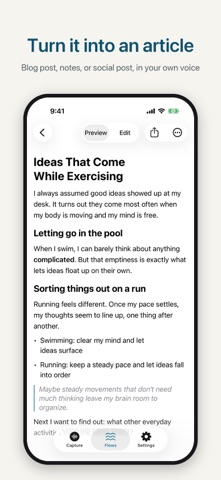
TURN IT INTO AN ARTICLE • Blog post, notes, social post, or a custom style, written in your own first-person voice • Set your personal writing style so articles sound like you • Edit and preview Markdown, then share the .md file or copy the full text • Or take a flow to your favorite AI assistant to talk it through, then paste the result back
ENGLISH AND CHINESE • The interface follows your iPhone's language (English or Traditional Chinese) • Choose the language for recording and AI in Settings › Recording & AI Language • Existing flows keep their language; when you write an article, NianFlow asks whether to translate it
YOUR DATA IS YOURS • No account, no ads, no tracking • Thoughts, flows, and articles stay on your device and sync between your iPhone and iPad through your own iCloud • AI runs on your iPhone with Apple Intelligence; your thoughts are never sent to an AI service or the developer, and no API key is needed
GOOD TO KNOW • AI features (transcript cleanup, Converge, Refresh, Write) require an iPhone that supports Apple Intelligence, turned on in Settings › Apple Intelligence & Siri. • Without Apple Intelligence, you can still record, transcribe, organize thoughts, listen, and take a flow to another AI assistant. • Text in photos is extracted on your iPhone. • Apple Watch recording requires a paired iPhone.
Questions or ideas? Email wdhsieh99@gmail.com.
Nutzer bewerten sie
Melde dich an, um diese App zu bewerten. Ehrlichkeit zählt.
Noch keine Bewertungen. Hast du die App ausprobiert? Gib die erste Bewertung ab.
Mehr Produktivität-Apps
Die besten neuen Produktivität-Apps dieser Woche ChickMark: Habit TrackerChickMark is a simple habit tracker for routines, goals, and reminders
 Dayflint: One Thing a DayToo many priorities?
 Snappy Do ItSix connected modes. One traceable journey.
 Fristo CAFMFristo is the app for Fristo CAFM, the facility management software
- BeginAnywayMorning alarm for hard tasks: set one task, prove you started, build a streak
 DHUDEDHUDE Analityxs es la herramienta de gestión diaria para grupos de restauración y ocio…