
Nom: Screenshot & File Cleaner
Nicht beanspruchtScreenshots, downloaded files, images apps saved — they pile up
Von Younghwa Kim · Dienstprogramme


Kurz gesagt
Nom is a utility app for clearing screenshots, downloaded files, and app-saved images from a phone. Items it "eats" stay in a holding list until the user digests them, and only Digest deletes them. One detail stands out: photos are never sent off the device, and no account or sign-in is needed.
Zusammenfassung von Debuts, basierend auf dem Eintrag im App Store.Info
Screenshots, downloaded files, images apps saved — they pile up. Nom eats them.
Nom is a yellow blob. No expression, no nagging, no streaks to keep. Just hungry.
Feeding is not deleting • What Nom eats sits in its belly. Have it spat back out any time — after 7 days Nom asks whether to digest. • Only Digest deletes for real. Photos then stay in Recently Deleted for another 30 days. • Files stay in the folder when fed; they only leave Nom’s list. Only “Digest” deletes them. • Files have no Recently Deleted, so Nom lists them by name and asks once more.
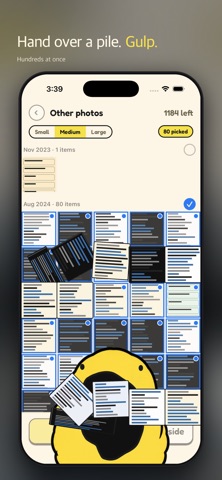
Picking • Every screenshot you have left, laid out like the Photos app. Tap the ones you don't need. • Tap a month to take the whole month, then tap back whatever you want to keep. • Pinch for 3, 5 or 8 across. Press and hold to see one large and flip through them. • Favourites and anything from the last 24 hours never show up. Photos with a location, Live Photos and portraits are kept out of Other photos too.
What it eats • Screenshots • Other photos — not screenshots, and not ones that look camera-taken. App-saved images land here • Videos and screen recordings — biggest first, press and hold to play one • PDFs and zips in your Downloads folder
Keeping something? Set it aside • Tap Set aside and Nom leaves it alone. • Send them to a Photos album later, all at once. The photo stays where it is — only the album is new.
No subscription. Clear 50 free every day, and 50 more each time you watch an ad. Settings keeps a running total of what you've freed.
Photos never leave your phone. No account, no sign-in.
Nutzer bewerten sie
Melde dich an, um diese App zu bewerten. Ehrlichkeit zählt.
Noch keine Bewertungen. Hast du die App ausprobiert? Gib die erste Bewertung ab.
Mehr Dienstprogramme-Apps
Die besten neuen Dienstprogramme-Apps dieser Woche Drainly: Speaker CleanerMuffled speaker after a splash, rain, or a sweaty workout?
 Photo & PDF Resize: KBFile too large to upload?
 Arvectum Proxy LauncherArvectum Proxy Launcher is a network utility that routes your iPhone through a proxy you…
 Vodoalarm: vodostaji BiHVodoalarm javlja kad tvoja rijeka naglo raste, pa ne moraš stalno gledati vodostaje
 Dusty: Photo Cleaner PetYour camera roll's new pet
 FairAuth: AuthenticatorFairAuth creates the codes for two-step verification on iPhone and iPad